Vue 3 컴포넌트 통신 설계 가이드
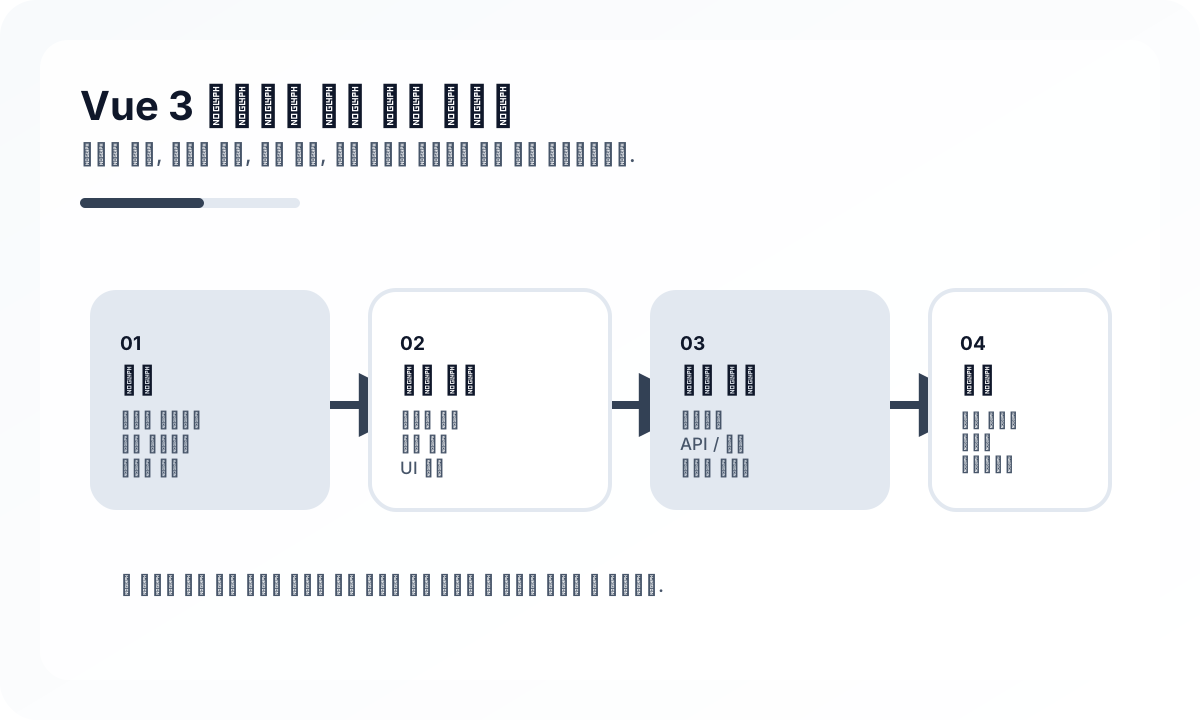
기본 원칙은 단방향 데이터 흐름
부모가 데이터를 내려주고, 자식은 이벤트로 의도를 알리는 구조가 가장 읽기 쉽습니다. 이 원칙이 유지되면 컴포넌트 책임이 분명해지고 테스트도 쉬워집니다.
props는 데이터 계약이다
props는 단순 값 전달이 아니라 재사용 가능한 인터페이스입니다. 자식 컴포넌트가 정말 알아야 하는 최소 정보만 받는 것이 좋습니다. 너무 많은 props는 상위 컴포넌트가 자식 내부 모델을 과하게 알고 있다는 신호일 수 있습니다.
emit은 상태 변경이 아니라 의도 전달
submit, close, select처럼 사용자의 의도를 알리는 이벤트 이름이 좋습니다. updateValue, setParentState처럼 상위 구현을 의식한 이름은 결합도를 높입니다.
provide/inject는 깊은 트리에서 선택적으로
깊은 컴포넌트 트리에서 공통 컨텍스트를 전달할 때 provide/inject는 유용합니다. 하지만 전역 상태 대체재처럼 사용하면 어디서 값이 오는지 추적하기 어려워집니다. 테마, 폼 컨텍스트, 읽기 전용 설정처럼 범위가 명확한 경우에 잘 맞습니다.
store는 정말 공유되어야 할 상태에만
여러 화면에서 함께 쓰는 인증 상태, 사용자 설정, 장바구니처럼 범위가 넓은 데이터는 store가 자연스럽습니다. 반대로 특정 페이지 안에서만 쓰이는 값까지 store에 올리면 복잡도만 커집니다.
자주 하는 실수
props drilling을 피하고 싶다는 이유만으로 바로 store를 도입하거나, 반대로 모든 깊은 전달을 props로만 버티는 경우가 많습니다. 중요한 것은 도구 선택보다 상태 범위를 명확히 정의하는 것입니다.
마무리
Vue 3 컴포넌트 통신의 핵심은 어떤 API를 아느냐보다 데이터 흐름을 얼마나 단순하게 유지하느냐입니다. props, emit, provide/inject, store는 경쟁 관계가 아니라 각자 맞는 범위를 가진 도구입니다. 경계를 분명히 잡으면 통신은 복잡도가 아니라 구조를 설명하는 수단이 됩니다.
운영 환경에서 어려워지는 지점
- 컴포넌트 통신은 props, emits, provide/inject, store, route state 사이의 데이터 소유권이 모호해질 때부터 단순하지 않다.
- 가장 어려운 버그는 두 방향 조정이 너무 많은 메커니즘에 흩어졌을 때 나온다.
- 통신 패턴은 다양성보다 일관성이 더 중요하다.
중요한 아키텍처 결정
- 부모-자식 계약은 우선 props와 emits로 명시적으로 표현한다.
- provide/inject는 숨은 상태 변경이 아니라 의존성 흐름과 안정적인 공유 서비스에 제한한다.
- 상태가 충분히 넓게 공유될 때만 store로 올린다.
실무 예시
깔끔한 부모-자식 계약은 입력과 출력을 명시적으로 유지한다.
<ChildForm
  :model-value="draft"
  @update:model-value="draft = $event"
  @submit="saveDraft"
/>
피해야 할 안티패턴
- 같은 상태를 두고 로컬 변경, emits, store 쓰기를 섞는 것.
- 컴포넌트 API 설계를 우회하려고 provide/inject를 쓰는 것.
- 일시적인 UI 조정을 너무 일찍 전역 상태로 승격하는 것.
운영 체크리스트
- 범위별 선호 통신 패턴을 문서화한다.
- 양방향 바인딩이 소유권을 명확히 유지하는지 검토한다.
- 이벤트 이름은 의미 중심, 도메인 중심으로 유지한다.
- 통신 경로가 기능보다 빨리 늘어나면 리팩터링한다.
최종 판단
좋은 컴포넌트 통신의 핵심은 명확한 소유권이다. 메커니즘보다 상태가 어디에 있고 어떻게 바뀌는지 설명 가능한지가 더 중요하다.
Continue Reading
다음으로 읽기 좋은 글
Vue Router 4 설계 가이드
Vue Router 4를 단순 라우팅 도구가 아니라 화면 전환과 권한 흐름을 설계하는 관점에서 정리합니다. 중첩 라우트, 가드, lazy loading, URL 설계 기준까지 다룹니다.
🖥️ FrontendVue 3 Composition API 완벽 가이드
Composition API 문법 소개를 넘어 로직 조합, composable 설계, ref와 reactive의 경계, 유지보수 관점까지 실무형으로 정리합니다.
💬 LanguageTypeScript Utility Types 실전 가이드
TypeScript 유틸리티 타입을 DTO, 업데이트 payload, selector, 파생 타입 설계에 어떻게 써야 하는지, 어디서부터는 가독성을 해치는지 정리합니다.
💬 LanguageModern JavaScript ES2024 문법 실전 해설
최신 JavaScript 문법을 단순 문법 소개가 아니라, 코드 품질을 실제로 높이는지 기준으로 읽습니다. 무엇이 진짜 도움이 되고 무엇은 여전히 절제가 필요한지 정리합니다.
다음 탐색