Jetpack Compose for Beginners: Declarative Android UI
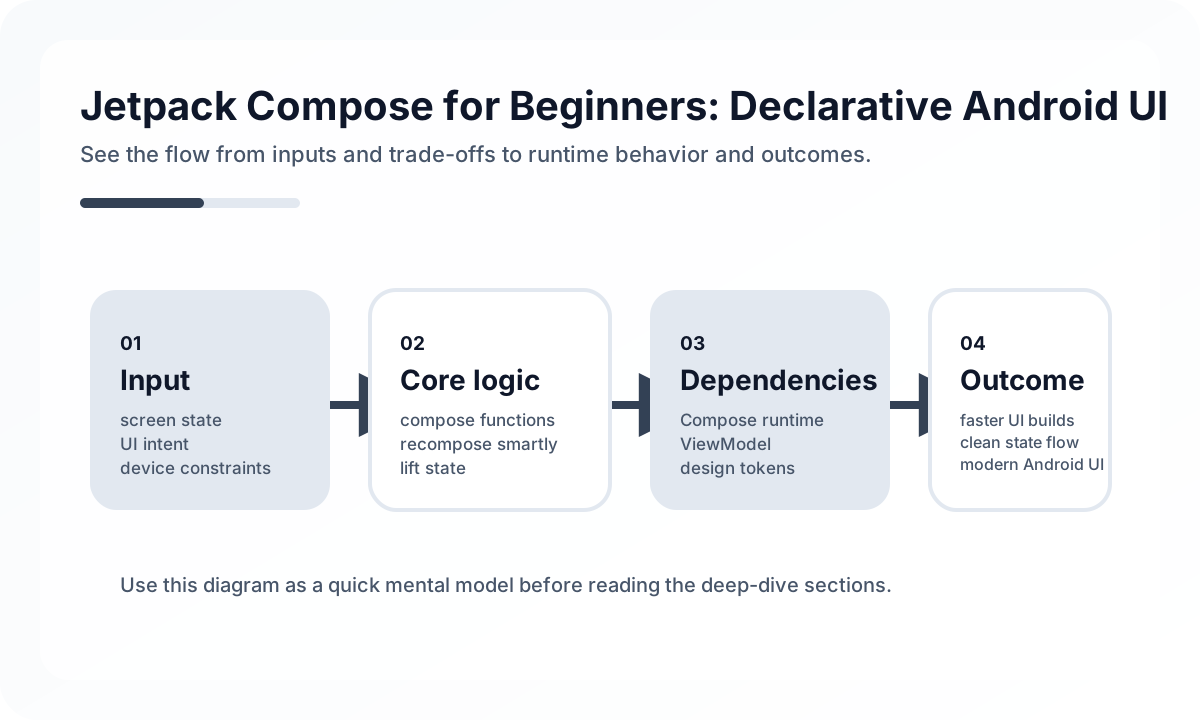
Compose Works Best With Clear State Ownership
Compose is built around recomposition, which means UI functions rerun whenever state changes. That is powerful only when state is owned deliberately.
In production apps, a common split is:
ViewModelowns screen state and side effects- composables render immutable state
- UI callbacks send user intent back upward
This keeps screens predictable and easier to test.
Hoist State Before You Need To
State hoisting sounds academic until a screen adds tabs, dialogs, pull-to-refresh, and navigation restore. Then it becomes the difference between a flexible screen and a tangled one.
Keep ephemeral UI state local when it truly belongs to one component. Move it up when multiple elements need to coordinate around it. The goal is not “everything high” or “everything local.” The goal is explicit ownership.
Build Reusable UI Without Hiding Too Much
Compose makes component extraction very easy, which creates a new risk: teams abstract too early and bury product meaning in generic wrappers. Prefer reusable composables that still reflect domain language.
Good:
PaymentSummaryCardOrderStatusChipRiskWarningBanner
Less good:
CustomBox2CommonCardContainer
Readable UI code depends on meaningful names as much as clean syntax.
Performance and Lists
Most Compose performance issues do not start with Compose itself. They come from unstable parameters, expensive work inside composition, and poorly managed lists.
Use LazyColumn for large lists, keep item identity stable, and move heavy transformation logic outside composables. If scrolling stutters, inspect state churn before assuming the framework is at fault.
A Practical Delivery Checklist
Before shipping a Compose screen, check:
- state is hoisted to the right level
- side effects use lifecycle-aware patterns
- previews cover core variants, not just the happy path
- lists, forms, and configuration changes preserve user progress
- accessibility labels and focus movement are intentional
Compose is not valuable because it is modern. It is valuable because it encourages a tighter loop between state modeling and UI behavior. Teams that embrace that discipline usually build faster and debug less.
Continue Reading
Related posts
A Startup Time Budget Playbook for Mobile Apps
Startup performance does not improve by instinct alone. This guide explains how to budget cold and warm start behavior in real mobile products.
📱 MobileMobile Learning Path: Beginner to Advanced
A practical mobile roadmap covering UI foundations, release safety, observability, and cross-platform design decisions.
💬 LanguageKotlin Basics for Java Developers
A practical guide to Kotlin for Java developers through a production lens. Learn what Kotlin changes in team habits, not just in syntax, especially around null safety, state modeling, and coroutines.
📚 IT StoriesHow Android Became the Mainstream Mobile Platform
As the phone industry shifted from device-centric products to app-centric platforms, Android spread with remarkable speed. This is the story of why.
Next Path