React Hooks Design Guide
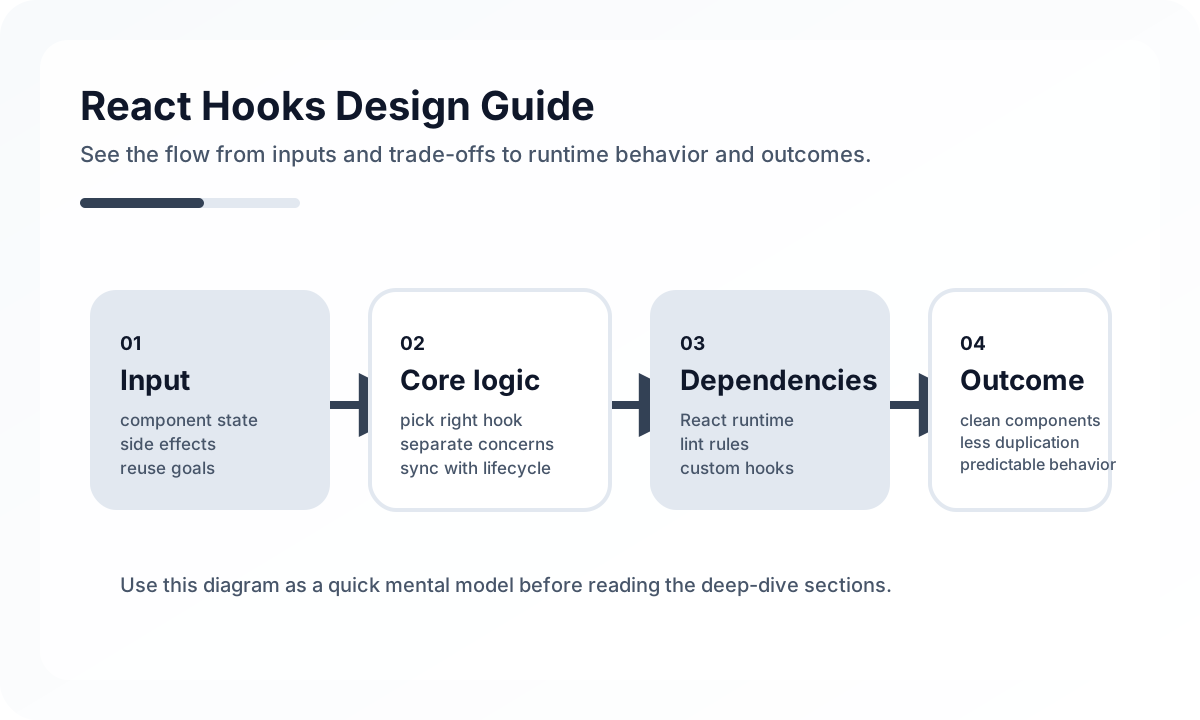
Good Hook design is less about shortening components and more about making state flow and rendering cost easier to understand.
Keep useState as close as possible
Local state is usually best kept close to the component that actually uses it. If you lift it too high, you create unnecessary rerenders and prop chains. If you place it too low, synchronization becomes harder.
import { useState } from 'react'

function Counter() {
  const [count, setCount] = useState(0)

  return (
    <div>
      <p>{count}</p>
      <button onClick={() => setCount((prev) => prev + 1)}>+1</button>
    </div>
  )
}
It is a good habit to use functional updates when the next state depends on the previous state. That reduces state races in async events and rapid consecutive updates.
Use useEffect only when synchronization is required
A lot of React code becomes hard to read because useEffect gets used too easily. Effects are for synchronizing state with the outside world after rendering, such as server requests, DOM APIs, event subscriptions, timers, or external libraries.
By contrast, derived values and direct responses to user events are often simpler without effects.
import { useEffect, useState } from 'react'

function UserProfile({ userId }) {
  const [user, setUser] = useState(null)

  useEffect(() => {
    let cancelled = false

    fetch(`/api/users/${userId}`)
      .then((res) => res.json())
      .then((data) => {
        if (!cancelled) setUser(data)
      })

    return () => {
      cancelled = true
    }
  }, [userId])

  return <div>{user?.name}</div>
}
When effects start multiplying, it helps to keep asking these questions.
- Could this value be computed during render instead?
- Could this logic live entirely in an event handler?
- Does this effect have a single responsibility?
- Are we hiding dependency issues by disabling eslint?
useRef is useful for values unrelated to rendering
useRef is not only for DOM access. It also works well for keeping values that should survive renders without causing rerenders, such as timer IDs, previous values, external instance handles, or flags that prevent duplicate work.
import { useRef } from 'react'

function TextInput() {
  const inputRef = useRef(null)

  function focusInput() {
    inputRef.current?.focus()
  }

  return (
    <>
      <input ref={inputRef} />
      <button onClick={focusInput}>Focus</button>
    </>
  )
}
Putting UI-visible state into useRef can make the UI drift from the data. On the other hand, putting values that do not affect rendering into useState causes unnecessary rerenders.
Memoization is an optimization tool, not the default
useMemo and useCallback are best used only when there is a real optimization need. If every calculation and function gets memoized by default, code becomes harder to read and dependency management becomes more complex.
The two key questions are simple.
- Is the computation expensive?
- Does referential stability actually matter for child optimization?
It is usually better to add optimization after profiling or after finding a concrete rendering bottleneck.
Custom hooks extract boundaries, not just repetition
A good custom hook is not just code moved to another file. It is a reusable unit of state, events, and effects with a clear responsibility.
import { useEffect, useState } from 'react'

export function useFetch(url) {
  const [data, setData] = useState(null)
  const [loading, setLoading] = useState(true)
  const [error, setError] = useState(null)

  useEffect(() => {
    let cancelled = false

    setLoading(true)
    setError(null)

    fetch(url)
      .then((res) => res.json())
      .then((json) => {
        if (!cancelled) {
          setData(json)
          setLoading(false)
        }
      })
      .catch((err) => {
        if (!cancelled) {
          setError(err)
          setLoading(false)
        }
      })

    return () => {
      cancelled = true
    }
  }, [url])

  return { data, loading, error }
}
This extracts the boundary of data fetching. Once server-state management becomes more serious, though, a tool like TanStack Query is often stronger than building a growing set of custom hooks by hand.
Problems caused by misusing Hooks
The most common issue is creating infinite loops by setting state again inside an effect. Another is packing data fetching, event binding, and derived-state calculation into one effect.
It is also common to try extracting every shared piece of logic into a custom hook. In many cases, readability matters more than reuse. If the responsibility is not clear yet, it is often better to leave the logic in the component.
Practical rules worth remembering
Teams that use React Hooks well usually do not focus on memorizing API names. They focus on boundaries.
- separate local UI state from server state
- use effects only for external synchronization
- extract custom hooks by responsibility
- use memoization only when there is evidence
- keep state with the nearest owner
Wrap-up
With React Hooks, what matters is not how many APIs you know, but whether state and side effects are placed correctly. Once the roles of useState, useEffect, and useRef are clear, components become not only shorter, but easier to read and easier to change. Hooks are most useful when treated as design tools, not just features.
What Gets Hard in Production
- Hooks become fragile when effect timing, stale closures, and implicit dependencies are not treated as architectural concerns.
- Custom hooks can accidentally hide too much behavior and make debugging harder than keeping logic local.
- A large app often suffers more from poorly designed hook interfaces than from hook count itself.
Architecture Decisions That Matter
- Use hooks to capture a reusable unit of stateful behavior, not simply to move lines out of components.
- Keep effects narrowly scoped to synchronization work instead of general control flow.
- Design custom hooks with stable inputs and outputs so consuming code remains easy to test.
Practical Example
A good hook boundary usually describes one responsibility clearly:
function useDebouncedSearch(query: string, delay = 300) {
  const [debouncedQuery, setDebouncedQuery] = useState(query)

  useEffect(() => {
    const timer = window.setTimeout(() => setDebouncedQuery(query), delay)
    return () => window.clearTimeout(timer)
  }, [query, delay])

  return debouncedQuery
}
Anti-Patterns to Avoid
- Putting API calls, analytics, DOM mutation, and navigation into one hook because they happen on one screen.
- Suppressing dependency warnings instead of fixing effect design.
- Creating hooks that return huge bags of state and callbacks with no clear contract.
Operational Checklist
- Review effect dependencies for synchronization intent, not just lint silence.
- Test custom hooks with failure and timing scenarios.
- Keep hook names tied to responsibilities rather than implementation trivia.
- Watch for hooks that are only used once and add indirection without reuse.
Final Judgment
Hooks scale well when they package one coherent behavior with explicit dependencies. They scale poorly when they become a hiding place for messy component logic.
Continue Reading
Related posts
Reconciliation Boundaries in Optimistic UI
Optimistic UI feels fast, but complexity appears when the server disagrees. This guide explains where optimistic updates should stop.
🖥️ FrontendReact Activity and View Transitions Adoption Notes
Recent React work around Activity and View Transitions is about more than animation. It changes how teams can approach UI continuity and preserved state.
📈 TrendsWhat the React Foundation Means for Engineering Teams
Why the React Foundation matters beyond governance news, and how it may affect framework coordination, ecosystem stewardship, and long-term frontend strategy.
💬 LanguageTypeScript Utility Types: A Practical Guide
A production-focused guide to TypeScript utility types. Learn how to model DTOs, update payloads, selectors, and derived types without making your type layer harder to read.
Next Path