Next.js 14 App Router Complete Guide: From Server Components to Routing
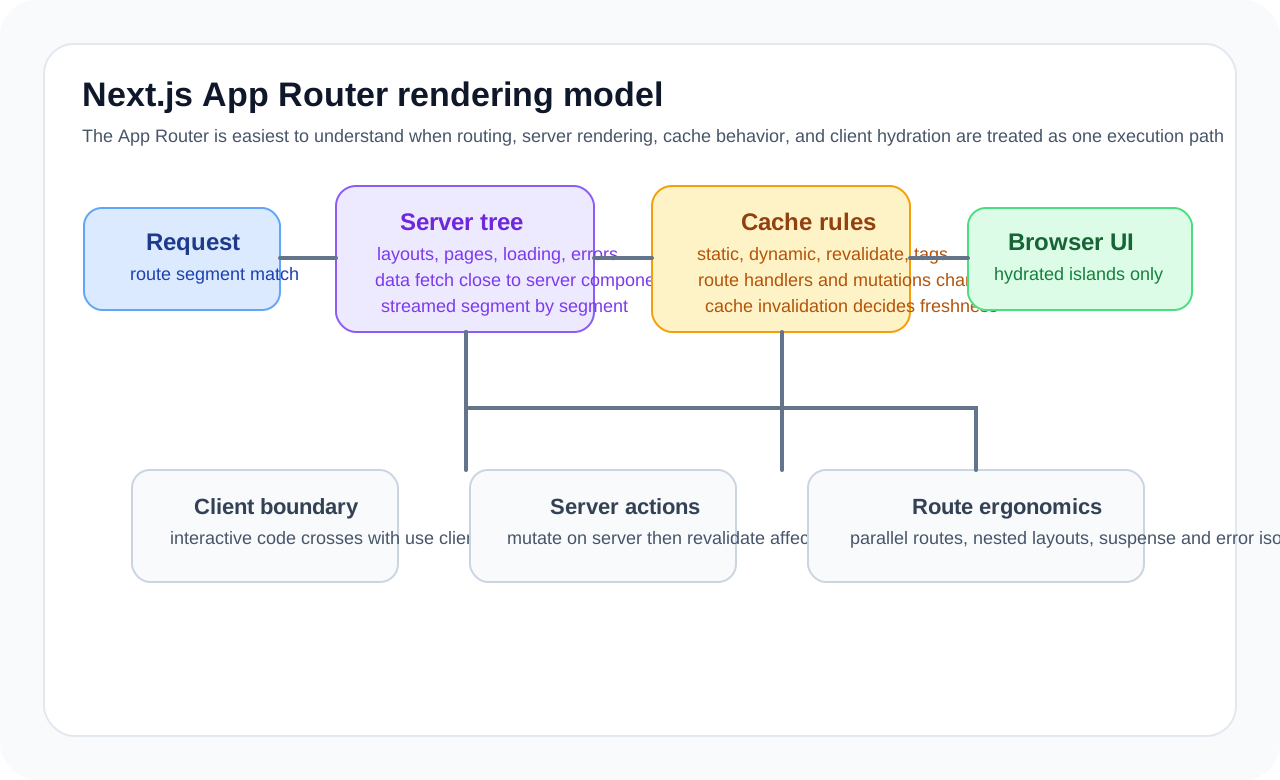
That is why teams familiar with the Pages Router often find App Router difficult. The folder structure changed, but so did the mental model: server components, streaming, caching, and layout persistence all arrived together.
This article focuses less on listing directory conventions and more on the structural decisions that matter in production.
The best starting point for understanding App Router
app/
├── layout.tsx
├── page.tsx
├── loading.tsx
├── error.tsx
├── blog/
│   ├── page.tsx
│   └── [slug]/
│       └── page.tsx
└── api/
    └── posts/
        └── route.ts
This is not just a matter of memorizing filenames. Each file type plays a different role in the rendering lifecycle.
layout.tsx: the persistent UI framepage.tsx: the actual route entryloading.tsx: Suspense-based loading UIerror.tsx: segment-level error recoveryroute.ts: server handler
In other words, the App Router is less a routing tool than a boundary placement system for UI and server logic.
The most important default: components are server components first
async function PostList() {
  const posts = await db.posts.findMany()

  return (
    <ul>
      {posts.map((post) => (
        <li key={post.id}>{post.title}</li>
      ))}
    </ul>
  )
}
In the App Router, components are server components by default. That means the following.
- they do not have to be included in the browser bundle
- they can stay close to server-only code
- data fetching and UI can be written closer together
This is one of the biggest strengths of the App Router. But it also means you need a good sense for sending only what truly belongs in the browser down to the client.
Client components should be the exception
'use client'

import { useState } from 'react'

function LikeButton({ postId }: { postId: string }) {
  const [liked, setLiked] = useState(false)

  return (
    <button onClick={() => setLiked((value) => !value)}>
      {liked ? '❤️' : '🤍'}
    </button>
  )
}
The moment you add 'use client', that file and its dependency subtree become part of the client-bundle story. A practical rule is simple.
- Does it need local state or events?
- Does it need browser APIs?
- Does it truly need client-side interaction?
A very common mistake is turning an entire page into a client component because of one button. It is usually better to push the client boundary down as late as possible.
Layouts are persistent UI, not just shared wrappers
export default function RootLayout({ children }: { children: React.ReactNode }) {
  return (
    <html lang="ko">
      <body>
        <Header />
        <main>{children}</main>
        <Footer />
      </body>
    </html>
  )
}
In the App Router, layouts are reused across segment navigation. That affects both state and rendering cost. Layouts are usually a good fit for things like these.
- global frames
- shared navigation
- section-level persistent layouts
By contrast, frequently changing data or page-specific orchestration logic tends to make layouts complicated very quickly.
Dynamic routes should be designed together with data strategy
export default async function BlogPost({
  params,
}: {
  params: { slug: string }
}) {
  const post = await getPost(params.slug)
  return <article>{post.content}</article>
}

export async function generateStaticParams() {
  const posts = await getAllPosts()
  return posts.map((post) => ({ slug: post.slug }))
}
The important question here is not just how to map a slug.
- Should this route be statically generated?
- Should it render again on each request?
- Should only some parts be revalidated?
In the App Router, routing and rendering strategy are tightly connected. It is usually better to think about caching and generation strategy while designing the URL structure.
loading.tsx and error.tsx are UX control points
export default function Loading() {
  return <div className="animate-pulse">Loading...</div>
}
'use client'
export default function Error({
error,
reset,
}: {
error: Error
reset: () => void
}) {
return (
<div>
<p>An error occurred: {error.message}</p>
<button onClick={reset}>Try again</button>
</div>
)
}These files are not just syntax elements. They are user-experience control points. Because the App Router supports streaming and segment-based rendering, loading and error experiences can be localized much more precisely.
A useful guideline is this.
- split loading UI by meaningful user-facing sections rather than huge page-wide blocks
- localize error recovery whenever possible
- retry only the failed segment instead of the whole app
Route handlers are still important
import { NextResponse } from 'next/server'

export async function GET() {
  const posts = await db.posts.findMany()
  return NextResponse.json(posts)
}

export async function POST(request: Request) {
  const body = await request.json()
  const post = await db.posts.create({ data: body })
  return NextResponse.json(post, { status: 201 })
}
Because page components can fetch data directly more often in the App Router, teams sometimes underestimate route handlers. They still matter for use cases like these.
- HTTP APIs consumed by external clients
- webhook and callback endpoints
- explicit server interfaces used outside the page-rendering path
Server components do not make the API layer disappear.
Metadata is part of the rendering pipeline
export async function generateMetadata({
  params,
}: {
  params: { slug: string }
}) {
  const post = await getPost(params.slug)

  return {
    title: post.title,
    description: post.description,
    openGraph: {
      images: [post.ogImage],
    },
  }
}
In the App Router, metadata can be built together with route data. That is especially important in content-driven services. But metadata generation is still tied to data-fetch cost, so teams need to avoid making it unnecessarily heavy.
The caching model is what teams miss most often
The most common App Router questions are usually these.
- Why is this data not changing?
- Why is it refetching every time?
- Why does local behavior differ from production?
Most of those come from an unclear understanding of the cache model. The App Router is not just SSR. It combines static generation, revalidation, server fetch caching, and streaming. For each screen, it helps to decide these things first.
- Does this need to be always fresh?
- Can it be cached for some period?
- Is static generation valuable here?
- Does it require user-specific dynamic behavior?
In other words, App Router is more about data lifecycle design than about file naming.
When the App Router is especially strong
- content-heavy services
- commerce and marketing sites
- admin interfaces with a lot of server data
- services where SEO and first-load quality matter
By contrast, very complex real-time collaboration apps or products with extremely heavy client state may feel more natural with a simpler client-centered structure.
Wrap-up
The essence of the Next.js App Router is not a new folder convention. It is a model that makes you redesign where rendering happens and how data flows through the React app. Its strengths appear when server components, layout persistence, streaming, and caching are understood together.
In production, it matters less to memorize filenames and more to ask: where should this screen render, and what data lifecycle should it have?
What Gets Hard in Production
- The App Router gives strong primitives, but its power comes with a stricter need to understand server boundaries, caching, and route segment behavior.
- Teams get into trouble when they mix server actions, client state, and revalidation without a consistent data-flow model.
- The framework can feel magical until debugging crosses layout nesting, segment config, and cache invalidation together.
Architecture Decisions That Matter
- Define which data should be fetched in layouts, pages, and leaf components, and why.
- Use server actions where they improve mutation flow, not as a blanket replacement for all API design.
- Choose caching and revalidation policy per route family so freshness expectations remain clear.
Practical Example
A clean App Router design keeps stable shell concerns in layouts and volatile data lower in the tree:
app/
  dashboard/layout.tsx
  dashboard/page.tsx
  dashboard/@activity/page.tsx
  dashboard/settings/page.tsx
Anti-Patterns to Avoid
- Marking large trees as client components because one child needs interactivity.
- Using server actions without defining retry, auth, and error semantics.
- Relying on implicit cache behavior that nobody on the team can explain.
Operational Checklist
- Document route segment config and cache expectations.
- Measure bundle impact of client components and hydration.
- Test revalidation behavior under concurrent mutations.
- Watch for layout-level data fetching that silently blocks unrelated routes.
Final Judgment
The App Router is strongest when the team treats layouts, server rendering, and cache policy as first-class architecture. Used casually, it feels productive at first and confusing later.
Continue Reading
Related posts
React Architecture Design Guide
This guide explains how to design a React application as a maintainable system, covering component boundaries, state layers, server state, rendering models, and team collaboration structure.
🖥️ FrontendMastering React Server Components: RSC and Server Actions
This guide explains React Server Components as an architectural choice rather than just a feature overview. It covers client-component boundaries, Server Actions, caching, streaming, and common production pitfalls in the context of the Next.js App Router.
📈 TrendsWhat the React Foundation Means for Engineering Teams
Why the React Foundation matters beyond governance news, and how it may affect framework coordination, ecosystem stewardship, and long-term frontend strategy.
🧪 TestPractical React Testing Library Design Guide
How to use React Testing Library as a user-centered testing tool. Covers query priority, interaction tests, async UI, provider wrappers, and how to avoid excessive mocking.
Next Path