Python asyncio: A Practical Guide to Asynchronous Programming
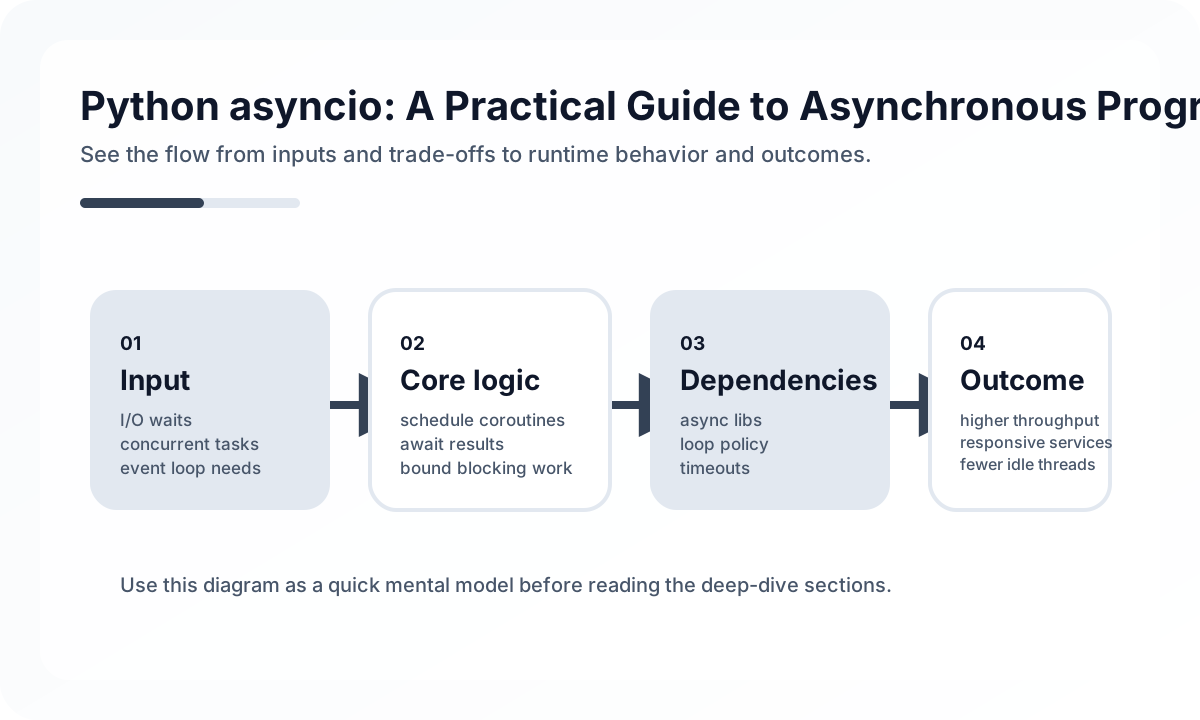
That distinction matters because many production issues blamed on “async complexity” are actually caused by unclear boundaries. Teams mix blocking and non-blocking code, skip cancellation design, and discover too late that a single bad library can freeze the event loop.
What asyncio Is Good At
asyncio shines when an application spends much of its time waiting rather than computing.
Good use cases include:
- API gateways that fan out to several upstream services
- crawlers and background jobs that manage thousands of sockets
- chat, notification, or event processing systems with many waiting tasks
- control-plane services where concurrency matters more than per-task CPU cost
The common thread is simple: there is enough idle waiting time to overlap.
What It Does Not Fix
asyncio is not the right default for every Python service.
It will not magically help when:
- the bottleneck is CPU-bound parsing, compression, or ML inference
- core libraries are synchronous and expensive to replace
- the team cannot maintain consistent timeout and cancellation rules
- the service already performs well with straightforward threaded workers
If a project has modest concurrency and mostly blocking libraries, a synchronous design can be cheaper to operate.
The Production Boundary That Matters
The real architecture question is not “Should we use async everywhere?” It is “Where should async begin and end?”
Healthy codebases usually draw a sharp line:
- async at I/O-heavy boundaries
- explicit wrappers for blocking work
- one policy for timeouts, retries, and cancellation
- structured concurrency rather than orphaned background tasks
Without those rules, await spreads through the codebase without making operations safer.
Example: Structured Concurrency With Timeouts
The pattern below uses TaskGroup, per-call timeout, and explicit error handling. This is much closer to production code than a bare gather() example.
import asyncio
from collections.abc import Sequence


async def fetch_all(client, urls: Sequence[str]) -> list[dict]:
    results: list[dict] = []

    async with asyncio.TaskGroup() as group:
        tasks = [group.create_task(fetch_one(client, url)) for url in urls]

    for task in tasks:
        results.append(task.result())

    return results


async def fetch_one(client, url: str) -> dict:
    try:
        async with asyncio.timeout(2.0):
            response = await client.get(url)
            response.raise_for_status()
            return response.json()
    except TimeoutError as exc:
        raise RuntimeError(f"upstream timeout: {url}") from exc
The important design choice is not just the syntax. It is that task lifetime, timeout, and failure propagation are all visible.
Cancellation Is a Design Problem
Cancellation is where many asyncio systems become fragile.
In a healthy service:
- request cancellation propagates to child tasks
- cleanup runs in
finallyblocks or context managers - timeouts are treated as part of the contract, not as emergency patches
- long-running background tasks have explicit ownership
In an unhealthy service, tasks keep running after callers disconnect, sockets stay open, and shutdown becomes slow or unsafe.
Blocking Work Must Be Isolated
The most common asyncio production mistake is accidentally blocking the event loop.
Typical sources include:
- synchronous database drivers
- filesystem-heavy code
- CPU-bound serialization or image processing
- legacy SDKs that pretend to be async by wrapping blocking work poorly
When blocking work is unavoidable, isolate it behind executors or move it into a separate worker model. If you do not, one bad code path can stall unrelated requests.
What to Measure Before Calling It a Success
An async migration should be judged on operating metrics, not the number of async def keywords added.
Measure:
- throughput at fixed CPU and memory budgets
- p95 and p99 latency
- event-loop lag
- timeout frequency
- open-connection growth
- shutdown time and cleanup reliability
If event-loop lag grows under load, the code is probably mixing in blocking work or creating too many tasks without backpressure.
Common Mistakes
- calling synchronous libraries directly from async handlers
- using
asyncio.gather()without a clear failure policy - creating fire-and-forget tasks with no owner
- adding retries without timeout budgets
- treating async as a universal performance optimization
These are less about Python syntax and more about system discipline.
Review Checklist
- Is the workload truly I/O-bound enough to justify async complexity?
- Are timeouts and cancellation part of the public behavior of the code?
- Does every task have a clear owner and lifetime?
- Are blocking libraries isolated from the event loop?
- Do metrics exist for event-loop lag, timeout rate, and open resources?
Closing Judgment
asyncio is powerful when used as a precise tool for high-concurrency I/O. It becomes expensive when teams use it as a vague modernization strategy. The best async systems are not the ones with the most coroutines. They are the ones where task ownership, timeout policy, and failure propagation are obvious from the code.
Continue Reading
Related posts
Python Decorators: A Practical Guide
A production-focused guide to Python decorators. Learn when decorators clarify cross-cutting policy, when they hide behavior, and how to keep them diagnosable in real codebases.
💬 LanguagePython Service Layer Pattern in Practice
How to keep Python applications maintainable by separating transport, domain rules, and persistence responsibilities.
⚙️ BackendJob Status Patterns for Long-Running Bulk APIs
Treating long-running backend work as a synchronous API problem usually hurts both user experience and operational stability. Here is a practical job-status pattern.
📈 TrendsJDK 25 Trends: How to Read LTS Adoption in Practice
JDK 25 reached GA on September 16, 2025 and serves as the reference implementation of Java 25. The real question is not how many JEPs landed, but which ones deserve production attention now.
Next Path