Vue State Management Strategy Guide
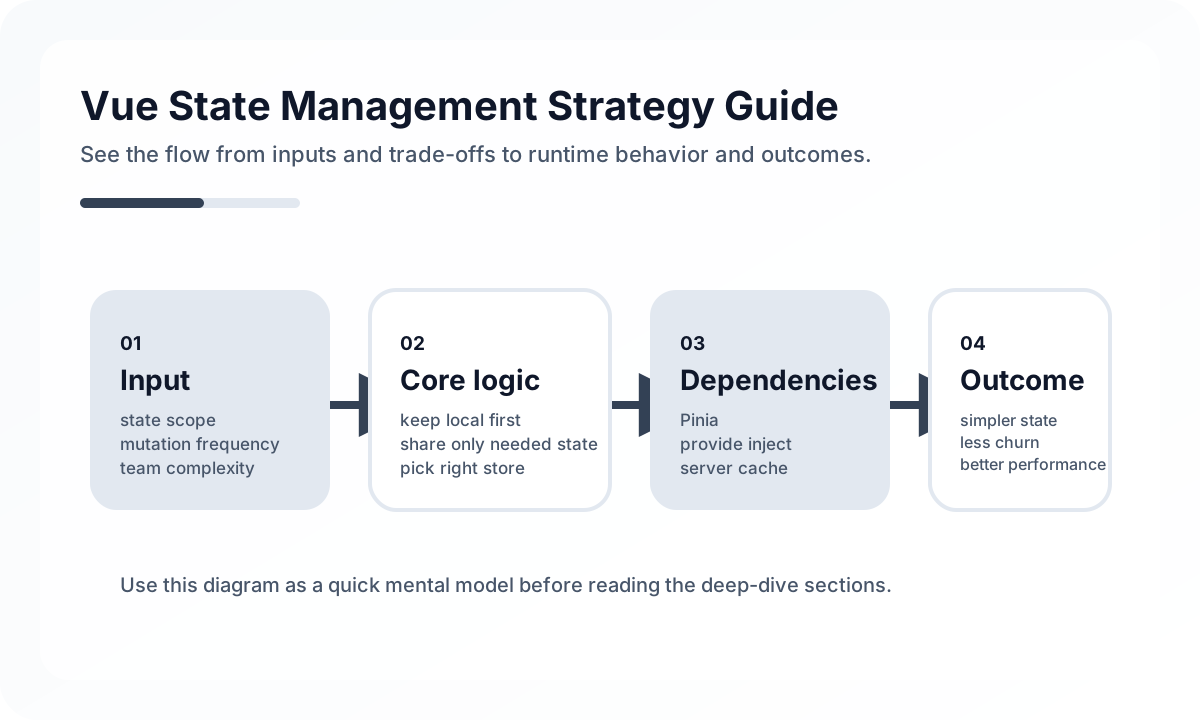
In Vue projects, state management often looks solved the moment Pinia is added. But the real problem is not choosing a library. It is deciding which information should be managed under which lifecycle and responsibility. Teams without a state strategy get slower as stores grow, debugging gets harder, and in SSR environments they can even hit hydration mismatches.
A good Vue state strategy starts not with “What should be global?” but with “What should not be global?”
Architecture diagram
[URL / Router State]
        |
        v
[Server State Layer]
        |
        v
[Pinia Domain State]
 cart / auth / editor session
        |
        v
[Local Component State]
 input / toggle / transient UI
In Vue, state tends to break down when every value gets lifted into Pinia. In reality, URL state, server data, domain state, and local UI state each need different rules. This diagram shows that Pinia should not act as the center of the universe, but as the place where only genuinely shared domain state lives between those other layers.
Classify state by nature, not by tool
One of the most common reasons Vue apps mishandle state is treating fundamentally different kinds of data with the same store pattern. In practice, it helps to separate at least four categories.
- Local UI state: dropdown open state, the current tab, intermediate form input
- Global UI state: toast messages, global modals, theme preference
- Server state: API responses, lists, detail data, and anything that must be revalidated
- Domain state: shopping cart, editing session, multi-step business flows
Without this separation, Pinia turns into a warehouse that absorbs every value. Eventually, it becomes unclear which state should be reset, which state should sync with the URL, and which state should survive a refresh.
Pinia is a global store, not a database
Pinia is a very natural choice in the Vue ecosystem, but it should not become the home of all data. In particular, if you keep long-lived copies of every server-side list and detail response inside Pinia, you run into predictable problems.
- freshness rules become unclear
- duplicate-request control gets harder
- cleanup rules during screen entry and exit get vague
- in SSR, the risk of state leaking between requests increases
That is why it is better to keep only state that truly matters across screens and has real domain meaning inside Pinia.
Do not mix server state and client state
A common Vue pattern is to fetch an API response, store it in Pinia, and let components read from there. It looks simple early on, but soon caching, refetching, loading, error handling, and optimistic updates become tangled together.
Server state is remote data, so it should be treated as a synchronization problem, not an ownership problem. Instead of storing it permanently in a global store, it is better to define clear revalidation and loading rules. At larger scale, considering a dedicated server-state tool is often the better move.
Split stores by feature, but avoid duplicate ownership
Even when dividing Pinia stores, you need discipline. It makes sense to split by domains like auth, user preferences, shopping cart, editor, and search filters, but if multiple stores end up owning the same data, consistency falls apart.
For example, if user data lives at the same time in authStore, profileStore, and headerStore, it becomes hard to know which one is authoritative. In production systems, it is better to define one owner for each piece of data and let other stores depend on references or derived values.
Be explicit about the relationship between URL and state
State like search filters, sort order, page number, and the selected tab often belongs in the URL when users expect to share or restore it after refresh. By contrast, something like a temporary modal-open flag or drag-in-progress state does not need to go into the URL.
If this boundary is blurry, Vue Router and Pinia end up expressing the same state in different ways, and some screens become recoverable while others do not. Deep-link quality drops quickly.
In SSR, state initialization rules matter even more
In Nuxt or other SSR setups, the state model needs to be stricter. Each request needs isolated state, and values generated on the server must restore consistently on the client. Treating state like a global singleton can leak data across requests or trigger hydration mismatches.
In SSR, you especially need to watch for the following.
- global objects that are not initialized per request
- initial-state calculations that depend on browser-only APIs
- flags with different defaults on server and client
- session and permission data that arrives too late and causes UI flicker
How to judge a good state strategy
In a Vue project, the state-management strategy is usually healthy when these questions have clear answers.
- Is ownership of each state clear?
- Is it clear which state should survive a refresh and which should not?
- Are freshness rules for server state explainable?
- Can features be tested without always passing through the global store?
- Are initialization and cleanup timings explicit?
Common anti-patterns
- caching every API response in Pinia for reuse
- lifting simple local state into the global store
- letting multiple stores own the same entity
- storing URL-worthy state only in memory
- keeping a client-centric structure in SSR with no state-initialization rules
Wrap-up
The core of Vue state management is not using Pinia well. It is making the nature of the state, ownership, restoration model, and freshness rules explicit. Centralizing state looks convenient, but at scale it increases system coupling.
In the end, a good state strategy is not about creating many stores. It is about minimizing global state while still expressing domain flows clearly.
What Gets Hard in Production
- Vue state strategy gets harder once local UI state, server cache, form state, and workflow state start getting mixed together.
- Teams usually do not fail because they picked the “wrong library,” but because they never defined state ownership rules.
- Global state that feels convenient at first can become the largest source of hidden coupling.
Architecture Decisions That Matter
- Keep ephemeral view state local unless multiple distant features truly coordinate on it.
- Reserve shared client state for cases where Pinia or carefully scoped composables provides clear ownership and reuse value.
- Treat server-derived data as server state with its own cache and invalidation policy.
Practical Example
A stable strategy usually distinguishes state by source and lifespan:
local state -> modal open, input draft, tab selection
server state -> fetched list, profile summary, permissions
workflow state -> checkout progress, wizard draft
shared client state -> theme, auth session, feature flags
Anti-Patterns to Avoid
- Promoting every repeated value into global state.
- Duplicating server cache into client stores because it feels easier to access.
- Choosing a tool before defining what problem the state layer is meant to solve.
Operational Checklist
- Write down ownership rules for local, shared, and server state.
- Review whether global stores are shrinking or growing with each feature.
- Measure rerender cost and stale-state incidents.
- Test optimistic and rollback behavior for cross-screen workflows.
Final Judgment
Vue state management works well when the team treats state as several different architectural classes. One store for everything usually means one source of complexity for everything.
Continue Reading
Related posts
Nuxt Architecture Design Guide
This guide explains the rendering strategy, data layer, routing boundaries, caching, and operating model to consider when designing a Nuxt-based frontend architecture.
🖥️ FrontendReact State Management Strategy Guide
This guide explains how to separate and design local state, server state, and global state in React applications from a practical engineering perspective.
⚙️ BackendA Practical Guide to CQRS and Event Sourcing
This guide explains CQRS and Event Sourcing in terms of domain boundaries, projections, consistency tradeoffs, snapshots, and operational complexity.
💬 LanguageType Narrowing at I/O Boundaries
A type system is strong inside the application, but external input still needs to be narrowed and validated early. This guide explains the boundary strategy.
Next Path