Vue + SSR Architecture Guide
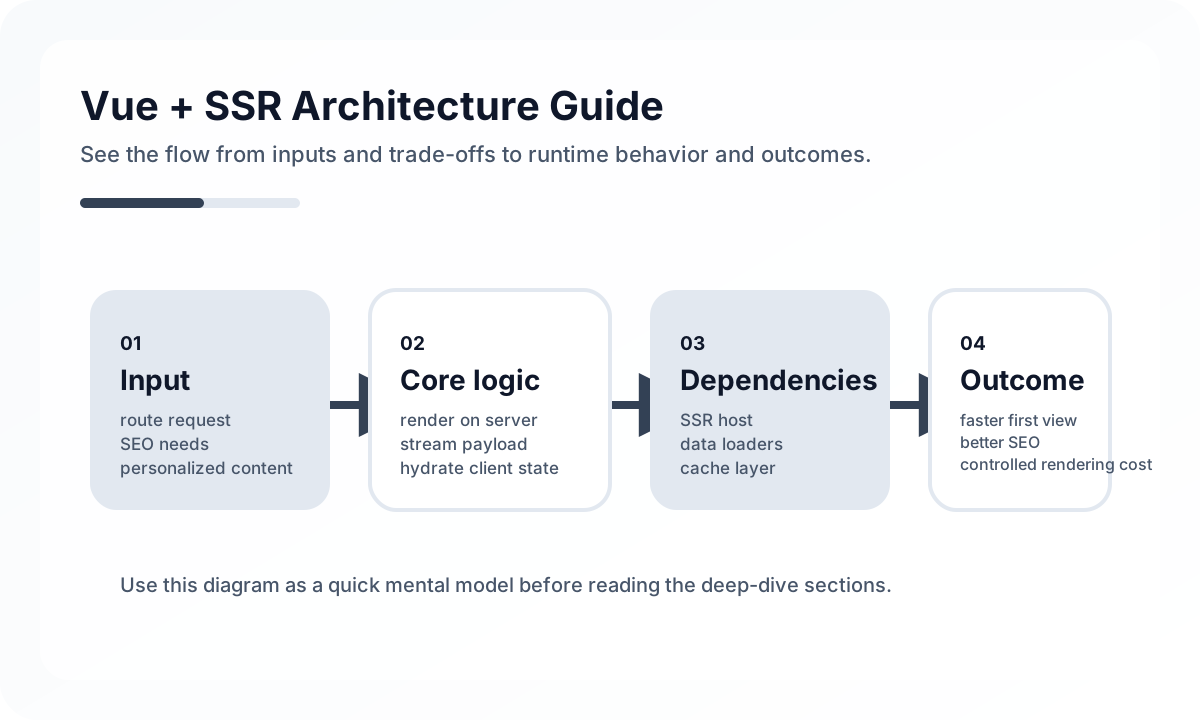
Architecture diagram
[Incoming Request]
       |
       v
[SSR Entry / Route Match]
       |
       v
[Server Data Fetch]
       |
       +--> [Public Cacheable Data]
       +--> [User-specific Data]
       |
       v
[HTML Render]
       |
       v
[Browser Hydration]
       |
       v
[Client-side Interaction]
The key point in SSR is that the server does not just generate HTML. It first decides which data must be finalized before rendering. If public data and user-specific data are handled the same way, the cache strategy breaks down. If everything gets pushed to the client, the benefits of SSR disappear. Stable SSR architecture requires rendering and caching to be designed together.
Common situations where Vue SSR is valuable
SSR delivers strong value in situations like these.
- the site has a lot of public content and search traffic matters
- first-view rendering speed has a real impact on product results
- shared-link previews and metadata quality matter
- each page needs server-prepared data before rendering
By contrast, if the product is mostly used only after login and SEO matters little, a plain SPA may be the simpler fit.
The biggest difference between SPA and SSR
In an SPA, the browser boots the application, fetches data, and renders the screen. In SSR, the server generates HTML first, and the browser displays that result and then takes it over in an interactive state.
That creates several structural differences.
- data loading is split between server and client
- cache strategy expands from browser cache to HTTP cache
- hydration cost becomes an explicit concern
- code must run safely on both server and client
Why Nuxt matters for Vue SSR
You can implement SSR with raw Vue, but in practice most teams need a framework like Nuxt. Building routing, data fetching, meta tags, the server rendering pipeline, and the deployment model from scratch is expensive.
With Nuxt, choices like SSR, SSG, hybrid rendering, and route rules become much more practical.
Data loading is about when and where
In SSR, data fetching can happen before the screen render. That is a major advantage, but it also means server latency becomes initial response latency. The important questions are these.
- should the server wait for all data
- should some data be filled in on the client
- how should cacheable data differ from real-time data
- how should server and client each express errors and empty states
The more data you preload for SSR, the richer the HTML becomes, but the longer TTFB can get.
Hydration cost always matters
Generating HTML on the server is not the end of the story. The browser still has to reconnect the Vue application on top of that HTML. If hydration is heavy, users get the awkward experience of seeing content quickly but not being able to interact with it right away.
That is why SSR projects need to pay attention to the following.
- only make the truly interactive parts complex
- reduce large client bundles
- lazy-load heavy widgets and editors
- separate server-only computation from client-side computation
Cache strategy has a major impact on SSR quality
If the server fully renders every request with no reuse, SSR gets expensive quickly. That is why HTTP cache, CDN cache, page regeneration, and API cache need to be designed together.
For example, pages like news, documentation, and blogs can often use strong cache policies, while personalized dashboards need a completely different strategy. In many cases, SSR is less about “rendering on the server” and more about “how much of each request can be reused.”
Common mistakes in Vue SSR
In real projects, the following issues show up often.
- using browser-only APIs directly in server code
- fetching all data through SSR and making responses too slow
- running into hydration mismatches
- serving dynamic content without a cache invalidation strategy
- forcing SSR onto screens where SEO value is weak and complexity is not worth it
SSR is powerful, but applying it to every screen is not always the right answer.
Structural conditions where Vue SSR works well
Vue SSR is particularly effective under these conditions.
- services that mix public pages and app-like experiences
- products where both content and interaction matter
- branding pages, documentation, blogs, or commerce detail pages where initial render quality matters
- teams that can collaborate across frontend and server infrastructure
Wrap-up
The point of Vue + SSR is not simply “rendering on the server.” It is designing initial experience, SEO, and cache strategy more effectively. It is more complex than an SPA, but when the product requirements fit, it can deliver a much stronger first impression and better structural advantages. The important thing is to treat SSR not as a trend, but as a rendering strategy with a clear cost-to-value ratio.
What Gets Hard in Production
- SSR helps initial load and indexing, but the system becomes harder when route data dependencies, cache behavior, and hydration assumptions are not explicit.
- Shared singletons can leak request state across users if the server runtime is treated like a browser app.
- Mixed rendering paths become difficult to reason about when some pages behave like SSR and others secretly depend on client-only assumptions.
Architecture Decisions That Matter
- Create fresh per-request app, router, and store instances.
- Decide which data is required for HTML completeness and which can safely load after hydration.
- Make serialization rules explicit for store state and sensitive data.
Practical Example
A durable SSR bootstrap separates request-scoped creation from rendering:
export function createAppContext() {
  const app = createSSRApp(App)
  const router = createRouter()
  const pinia = createPinia()

  app.use(router)
  app.use(pinia)

  return { app, router, pinia }
}
Anti-Patterns to Avoid
- Reusing process-wide mutable state between requests.
- Treating SSR as only an SEO checkbox while skipping data dependency and cache design.
- Embedding large serialized payloads that erase the gain from server rendering.
Operational Checklist
- Audit request isolation for stores, i18n, and auth context.
- Measure server render latency separately from hydration cost.
- Verify serialization size and escaping rules.
- Test cache invalidation for SSR HTML and API data together.
Final Judgment
Vue SSR pays off when the team is disciplined about request isolation and HTML completeness. If not, it often becomes a complicated SPA with extra failure modes.
Continue Reading
Related posts
Nuxt Architecture Design Guide
This guide explains the rendering strategy, data layer, routing boundaries, caching, and operating model to consider when designing a Nuxt-based frontend architecture.
🖥️ FrontendRendering, Caching, and Hydration Strategy for Large Frontends
A production-oriented guide to combining SSR, SSG, ISR, RSC, hydration boundaries, browser cache, CDN cache, and data cache in large frontend systems.
📈 TrendsWhat the React Foundation Means for Engineering Teams
Why the React Foundation matters beyond governance news, and how it may affect framework coordination, ecosystem stewardship, and long-term frontend strategy.
🧪 TestPractical Vue Testing Library Design Guide
How to test Vue components with Vue Testing Library and Vitest from the user's point of view. Covers rendered output, interactions, async UI, Pinia/Router integration, and how to avoid implementation-heavy tests.
Next Path