Vue + SPA Architecture Guide
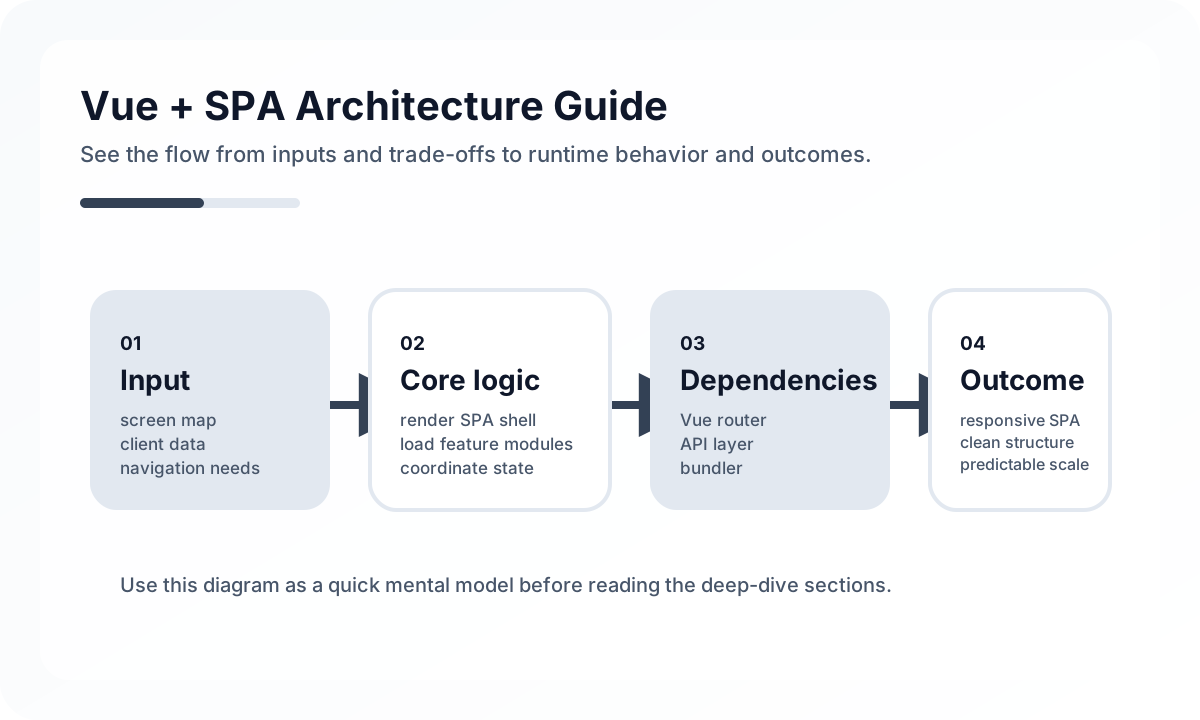
Architecture diagram
[Vue Router]
     |
     v
[Page Shell]
     |
  +--+-------------------------+
  |                            |
  v                            v
[Feature Components]      [Shared Layout]
  |                            |
  v                            v
[Pinia / Local State]     [Navigation / Theme]
  |
  v
[API Client / Server State]
  |
  v
[Backend / BFF]
In a Vue SPA, the router is not just a navigation tool. It is the skeleton of screen context. Feature components sit on top of it, state is divided into global stores and local state, and server data is managed with separate rules. If those layers are not separated, components end up carrying screens, state, and networking all at once.
When Vue + SPA is a strong fit
Vue SPAs are especially strong in products like these.
- back-office tools with heavy interaction after login
- admin consoles, dashboards, and collaboration tools
- products where fast screen transitions and rich client state matter
- services where task efficiency matters more than search engine visibility
By contrast, public content-heavy sites, SEO-driven media, and landing pages where initial load is critical should usually be compared against SSR or SSG options.
Routing and state matter most in SPA architecture
A Vue SPA is fundamentally a client application that renders the right screen for the current URL. That makes the router and the state model the structural center.
- the URL should explain user flow and screen state
- page-specific state and global state should stay separate
- server data should be managed with cache policy
- you should distinguish what to reload and what to preserve between pages
Without those rules, the SPA quickly becomes a monolithic app trapped inside the browser.
In a Vue SPA, the router is the app skeleton
Vue Router is more than a page transition library. User flow should be visible in the URL itself, through patterns like dashboard, detail, edit, and settings. That improves history behavior, bookmarks, authorization, and recovery.
Nested routes are also valuable because they let you keep the parent layout stable while swapping only child content. That is an important part of making SPA transitions feel smooth.
Keeping state narrow leads to healthier structure
One of the main reasons Vue SPAs become heavy is that every piece of state gets lifted globally. A more maintainable split looks like this.
- local state: form inputs, panel open state, temporary selections
- URL state: search conditions, sorting, pagination
- shared state: authentication, user preferences, shared filters
- server state: lists, detail data, and data that must be refreshed
In particular, filters and search conditions work better when they live in the URL because that improves both user experience and shareability.
Server state needs more than plain fetch
At first, SPAs make it look like client-side data fetching is enough. In real operation, stale data, duplicate requests, race conditions, optimistic updates, and loading-state consistency start to matter. That is why API requests should be treated not as utility functions, but as a layer with cache and synchronization policy.
Initial load cost is one of the SPA’s biggest weaknesses
As the client bundle grows, first-entry experience gets worse. In Vue projects, the following deserve special attention.
- route-level code splitting
- lazy loading for heavy chart and editor libraries
- avoiding oversized shared bundles
- image and font optimization
- minimizing required data before the first render
SPAs make transitions fast, but the real challenge is controlling the cost of the first entry.
Design authentication and authorization together with the router
Because Vue SPAs often have many post-login screens, it is better to sort out auth and authorization at the router and layout boundaries rather than scatter checks through components. If authenticated and public areas are clearly divided at the router level, the whole structure becomes easier to read.
Common operational problems in SPAs
In production, these issues show up often.
- refreshing a deep path returns a 404
- browser history and internal state drift apart
- old global state survives too long and shows the wrong screen
- large bundles slow down initial entry
- the whole screen breaks because there is no error boundary
Most of these problems come back to deployment settings, routing design, state scope, and error strategy.
What you need to keep a Vue SPA healthy long-term
- design URL state intentionally
- minimize global state
- separate the API layer
- optimize page transitions differently from first load
- design error, loading, and empty states explicitly
An SPA is not just an app that does not reload pages. It is an application that has to stay alive in the browser for a long time.
Wrap-up
The point of Vue + SPA is not building something quickly, but building a structure that keeps working reliably inside the browser over time. When the router, state, cache, code splitting, and deployment model all fit together, an SPA can provide both a smooth user experience and high team productivity.
What Gets Hard in Production
- Vue SPA architecture gets hard when navigation, data fetching, permissions, and layout persistence evolve independently.
- Long-lived browser sessions expose memory leaks, stale cache behavior, and implicit global state more quickly than teams expect.
- The SPA model is still viable, but only if the page lifecycle is treated as a system rather than a set of screens.
Architecture Decisions That Matter
- Center route ownership around Vue Router and explicit screen boundaries.
- Define how server data is cached, invalidated, and refreshed across route transitions.
- Keep application shell, feature modules, and shared domain logic separated.
Practical Example
A reliable SPA usually separates shell, feature routes, and data access concerns:
app shell
  -> route modules
    -> screen containers
      -> presentational components
  -> shared query layer
  -> shared auth/session layer
Anti-Patterns to Avoid
- Letting route components fetch everything ad hoc with no common policy.
- Keeping too much transient state alive across navigations.
- Growing a monolithic
src/pagesdirectory with no feature ownership.
Operational Checklist
- Review route-level bundle size and transition latency.
- Track stale cache and duplicated request patterns.
- Test browser navigation and reload behavior on critical workflows.
- Measure memory growth during long sessions.
Final Judgment
Vue SPAs remain a strong choice for interaction-heavy products, but only when route transitions, state ownership, and cache policy are architected deliberately.
Continue Reading
Related posts
Vue.js Architecture Design Guide
This guide explains how to design a Vue.js project as a maintainable frontend system rather than just a collection of components, covering state boundaries, routing, data flow, folder structure, performance, and collaboration.
🖥️ FrontendReact + SPA Architecture Guide
This guide explains the screen boundaries, state structure, routing, data layer, and performance strategy needed to design a React-based SPA in production.
⚙️ BackendA Practical Guide to CQRS and Event Sourcing
This guide explains CQRS and Event Sourcing in terms of domain boundaries, projections, consistency tradeoffs, snapshots, and operational complexity.
💬 LanguageType Narrowing at I/O Boundaries
A type system is strong inside the application, but external input still needs to be narrowed and validated early. This guide explains the boundary strategy.
Next Path