Vue Component Design Principles Guide
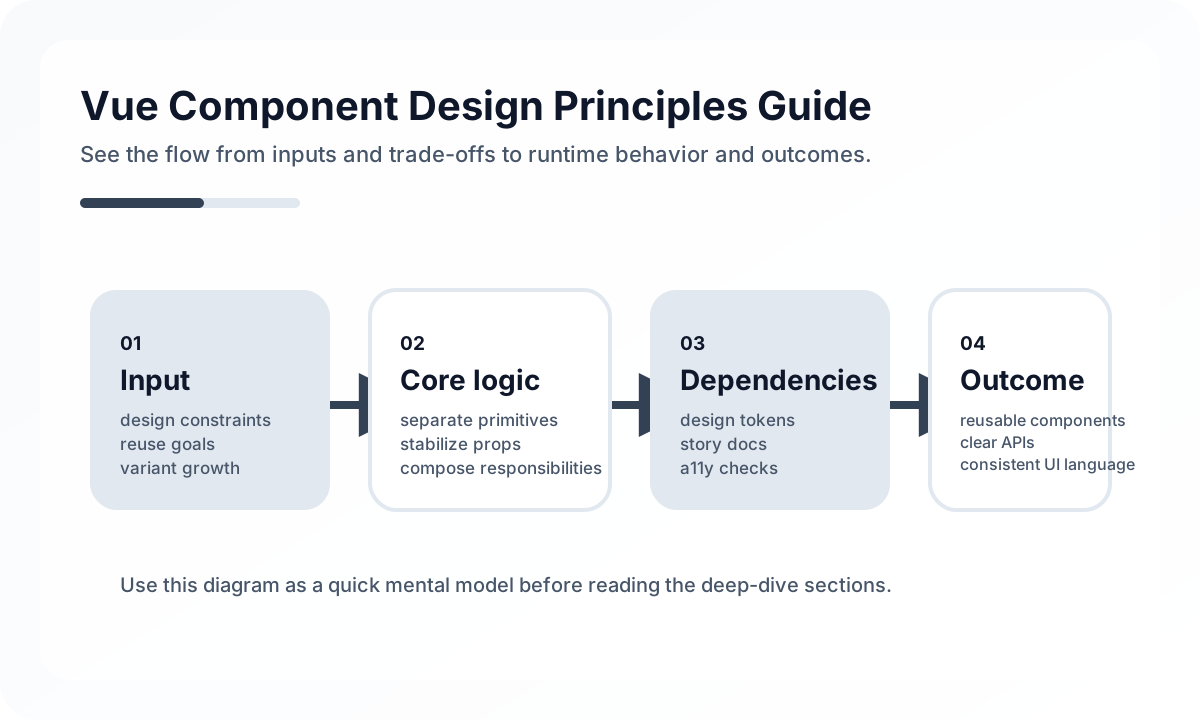
Vue’s template-based structure makes UI easy to read, but as a project grows, component design quality starts to determine overall maintainability. Splitting components into many pieces does not automatically create a good structure, and heavy reuse does not automatically mean strong design. What matters is making each component’s responsibility, inputs, emitted events, and reuse context explicit.
Architecture diagram
[Page]
  |
  v
[Feature Component]
  |  props in
  |  events out
  v
[Base UI Components]
  |
  v
[Design Tokens / Style Rules]
In a good component structure, the lower you go, the more presentation-focused it becomes, and the higher you go, the more context-focused it becomes. Pages compose features, feature components represent use cases, and base UI components focus on pure presentation. That is why props and events are not just syntax. They are contracts that expose the responsibility boundaries of each layer.
Components are units of responsibility, not just reuse
Many teams treat components only as UI fragments that might be reused later. In practice, responsibility comes before reuse. If a component carries both domain rules and UI presentation at the same time, it may look reusable but still be tightly coupled.
It is usually helpful to think of Vue components in three layers.
- Base UI components: presentation-first elements like buttons, inputs, and cards
- Feature components: feature-specific blocks like search filters, product lists, and checkout summaries
- Page composition components: pieces that assemble multiple feature blocks on a page
Without that distinction, every component gets mixed into the middle and “reusable component” ends up meaning a screen-specific component with a generic name.
Props are contracts, not just data pipes
In Vue, props pass values from parent to child, but from a design perspective they are more importantly the component’s input contract. The goal is not merely to reduce the prop count, but to make meaning clear.
Useful criteria for prop design include the following.
- Can you understand the role from the prop name alone?
- Are strongly coupled values grouped appropriately instead of scattered?
- Are display-only values and behavior-control values kept distinct?
- Does the parent need to know too much about the child’s internals?
In particular, a growing number of boolean props often means the component is trying to force too many variants into one structure. At that point, splitting the component or redesigning the slot strategy may be a better choice.
Events should express actions
In Vue, it is natural for children to communicate upward by emitting events. A common mistake is naming events from the perspective of the internal implementation. For example, select-item, submit-filter, and confirm-delete are better than click-item because they describe user action.
When an event name reflects behavior, the parent-facing contract stays stable even if the internal implementation changes. Implementation-driven names tend to shake the contract whenever interaction details shift.
Slots are an extensibility tool, not an escape hatch
Slots in Vue are extremely powerful. They work well for extension points like headers, actions, empty states, and custom cells. But overusing slots turns a component into little more than a shell whose internal structure the parent has to rebuild.
A good slot design usually has these traits.
- It opens only the places that repeatedly need variation.
- The component’s core responsibility still stays inside the component.
- The default experience is complete enough even without slots.
Split components by reason to change, not file length
A long file is not enough reason to split a component. On the other hand, even a short component may be worth separating if different parts change for different reasons. The more practical questions are these.
- Will this piece be used on other screens with the same responsibility?
- Does this block get changed often for a different reason?
- Do testing or replacement require an independent unit?
Without a clear split criterion, excessive decomposition can make the code harder to read instead of easier.
Do not push domain logic into templates
Vue templates read well, but they become difficult quickly when filtering conditions, permission branches, data transformations, and complex display rules accumulate. At that point, the logic should move into computed values, composables, or presenter-like functions.
Templates should stay close to “what is shown,” while “why it is calculated this way” belongs in the script section or another layer.
Composables share logic, but hidden state is risky
In Vue 3, composables are a strong reuse tool, but if they hide state and side effects together, debugging gets harder. In particular, when several composables behave like implicit global state, they can create even riskier coupling than the component tree.
That is why composables are best used with the following rules.
- a clear bundle of logic with one responsibility
- a function shape whose inputs and outputs can be explained
- explicit structure around whether state is actually shared
Common anti-patterns
- too many props and slots in the name of generic reuse
- screen-specific business logic leaking into base components
- template conditionals growing until they are hard to read
- emit names tied to implementation instead of behavior
- composables acting like hidden global state
Wrap-up
The core of Vue component design is not the technique of slicing screens apart, but making responsibilities, contracts, extension points, and domain boundaries explicit. Well-designed components are not good because they are highly reusable. They are good because their reason to change is clear and their structure is obvious to the next reader.
In the end, building strong UI structure in Vue is not about making pretty templates. It is about using components to reveal the separation of responsibilities in the application.
What Gets Hard in Production
- Vue design systems fail when components are shared widely but their contracts, tokens, and accessibility guarantees are weak.
- The real challenge is not creating a button library. It is preserving consistency while product requirements diversify.
- A mature system must balance reuse, escape hatches, and governance.
Architecture Decisions That Matter
- Separate design tokens, primitives, patterns, and product-specific components.
- Treat accessibility, theming, and composition APIs as first-class architecture.
- Version component contracts and migration rules deliberately.
Practical Example
A healthy design system stack usually has clear layers:
tokens -> color, spacing, typography
primitives -> Button, Input, Stack
patterns -> FormSection, DataTableToolbar
product features -> page-specific composition
Anti-Patterns to Avoid
- Putting product-specific logic into supposedly generic components.
- Expanding props endlessly instead of designing composition points.
- Ignoring accessibility debt until adoption is already broad.
Operational Checklist
- Review API surface growth for shared components.
- Keep usage examples and constraints documented.
- Test accessibility and theme variants continuously.
- Track where teams bypass the system and why.
Final Judgment
Vue design systems become flagship assets when they define reliable constraints, not just reusable parts. Governance and contract quality matter as much as visual consistency.
Continue Reading
Related posts
Vue.js Architecture Design Guide
This guide explains how to design a Vue.js project as a maintainable frontend system rather than just a collection of components, covering state boundaries, routing, data flow, folder structure, performance, and collaboration.
🖥️ FrontendVue + SPA Architecture Guide
This guide explains how to design a Vue-based SPA as a long-lived single-page application rather than just a quick build, covering routing, state, data fetching, caching, deployment, and performance.
⚙️ BackendA Practical Guide to CQRS and Event Sourcing
This guide explains CQRS and Event Sourcing in terms of domain boundaries, projections, consistency tradeoffs, snapshots, and operational complexity.
💬 LanguageType Narrowing at I/O Boundaries
A type system is strong inside the application, but external input still needs to be narrowed and validated early. This guide explains the boundary strategy.
Next Path