Vue.js Architecture Design Guide
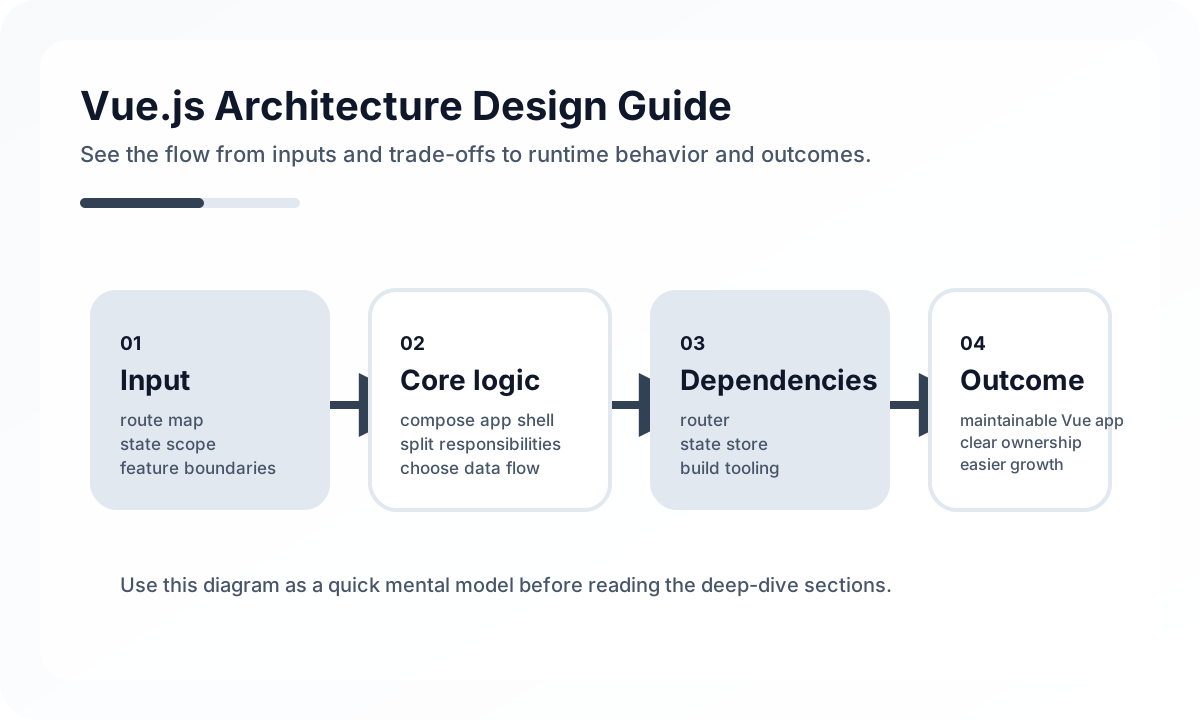
Architecture diagram
[Route / Page]
      |
      v
[Feature Layer]
  Product / Checkout / Account
      |
  +---+--------------------+
  |                        |
  v                        v
[Composable]          [UI Components]
  |                        |
  v                        v
[API Client / Server State] [Base UI / Design Tokens]
      |
      v
   [Backend / BFF]
The point of this structure is to keep pages from owning every responsibility. In Vue, composables become the place where logic is assembled, UI components stay focused on presentation, and the API layer centralizes rules for accessing server state. In the end, maintainability depends less on the number of components than on how clear these boundaries are.
The main axes of Vue architecture
A good Vue architecture usually balances five things.
- how well screen logic and domain logic are separated
- how local state and global state are distinguished
- how API requests and server state are managed as a boundary
- how reusable UI and screen-specific UI are divided
- whether the team can read and extend the structure easily
Vue is flexible and allows many styles, but if those five axes are not clarified early, flexibility can quickly turn into inconsistency.
Common layers in a Vue project
In production projects, the following layers are usually easy to read.
pages: screen units mapped directly to routesfeatures: domain-specific feature bundlescomponents: shared UI componentsstores: shared state managementcomposables: reusable state and behavior logicservicesorapi: external API calls and data accessmodelsortypes: domain types and transformation rules
The critical point is not the folder names, but the dependency direction. pages should use features and components, and features can use composables and services, but shared layers should not reach back upward into screen layers.
Split components by responsibility, not just by UI size
In Vue projects, it is easy either to split components into pieces that are too small or to push too much logic into a page. A better rule is: can this component explain its own responsibility in one sentence?
For example:
UserCard: responsible for presenting user informationUserListPage: responsible for orchestrating search, filters, and list loadinguseUserFilter: responsible for filter state and derived conditions
With that separation, Vue components stay focused on presentation, while reusable composition logic can move into composables.
State should be layered by scope
One of the most common reasons Vue projects become hard to manage is that different scopes of state get mixed together. It helps to think in at least three categories.
- local UI state: modal visibility, input values, selected tabs
- shared client state: authentication, user preferences, shopping cart
- server state: data fetched from APIs that must be synchronized again
Keep local UI state in the component or a nearby parent, shared client state in a store such as Pinia, and server state in a separate data layer with cache and refetch rules. As soon as everything gets pushed into the store, the structure starts to blur.
Composition API is a tool for expressing structure
The real value of the Composition API is not the setup() syntax itself. It is the ability to separate concerns into functions. Composables like useAuth, usePagination, useInfiniteScroll, and useSearchFilter reduce repeated patterns across screens.
But extracting every piece of logic into a composable is not automatically good architecture. A composable only makes sense when its responsibility and reuse value are clear. If the logic is still tightly tied to one screen, leaving it in the page may be easier to read.
Routing should reflect information architecture
Vue Router is not just a navigation tool. Because the URL becomes part of the information structure, route design is part of frontend architecture.
A good route structure should do the following.
- make user flow understandable from the URL alone
- let nested routes explain layout boundaries
- apply authentication and authorization policies consistently
- work naturally with lazy loading
For example, in an admin section, URLs like /admin/users, /admin/audit-logs, and /admin/settings make maintenance easier because the function and domain are visible in the URL itself.
The API layer is better when it stays out of components
At the beginning, calling fetch() directly inside a page does not look like a problem. Over time, though, you need error handling, auth headers, response mapping, retry rules, and logging. If API calls are scattered across components, the cost of change grows quickly.
That is why teams often separate the following.
api client: shared HTTP settings, interceptors, and error mappingservice: domain-specific API functionsmapper: server response to UI model transformation
With that structure, a small backend response change does not shake the entire UI.
Do not mix shared UI and domain UI
Buttons, inputs, modals, and badges from a design-system layer should stay separate from cards, filter panels, and sort tabs that only make sense inside a specific feature. The former are generic UI. The latter are domain UI.
If generic UI starts absorbing too many domain-specific needs, reusability collapses. If domain UI becomes too generalized, readability collapses instead. A Vue component library needs to keep that balance.
Performance is also a structure problem
Vue usually performs well by default, but poor structure still shows up quickly.
- giant stores widen the rerender surface
- deep prop chains and repeated calculations make screens heavier
- no route-level code splitting increases initial bundle size
- treating server state like long-lived global state creates stale data
Performance is tied directly to state scope, data flow, and code-splitting strategy.
Architecture matters for collaboration too
Rules that feel obvious when working alone need to become explicit when a team grows. In Vue projects, collaboration gets easier when these are defined.
- documentation for the roles of pages, features, composables, and stores
- consistent rules for where API calls live and how errors are handled
- clear criteria for shared UI versus domain UI
- agreed folder structure and import boundaries
- clear test priorities and targets
Structure has to become a shared language before it can become good code.
When to revisit Vue architecture
The following signals usually mean the structure needs attention again.
- the same API and error-handling code repeats across pages
- one Pinia store holds too many domains
- similar UI appears in multiple slightly different versions
- composables have many names but vague responsibilities
- people frequently hesitate about where new files should go
At that point, reorganizing boundaries usually speeds the team up more than continuing to pile on features.
Wrap-up
The core of Vue.js architecture is not how many framework features you know, but how clearly you separate state, responsibility, and dependency direction. Once it is obvious why components, composables, stores, the API layer, and the router each exist, a Vue project becomes a system that can last much longer.
What Gets Hard in Production
- Vue architecture degrades when boundaries blur and every feature reaches into everything else.
- Most maintainability problems are not caused by JSX or templates, but by unclear ownership of data, side effects, and composition.
- A strong codebase has explicit component, composable, route, and store boundaries.
Architecture Decisions That Matter
- Organize by feature and responsibility before organizing by file type convenience.
- Keep business logic close to domain modules and UI assembly close to routes or screens.
- Decide how shared utilities, data access, and stateful abstractions are allowed to cross boundaries.
Practical Example
A maintainable front-end structure usually mirrors ownership rather than framework primitives:
features/
  billing/
  catalog/
shared/
  ui/
  api/
  utils/
app/
  routes/
  providers/
Anti-Patterns to Avoid
- One giant component tree with no domain grouping.
- Shared folders that become a dependency sink for everything.
- Mixing transport concerns, business rules, and presentation formatting in the same modules.
Operational Checklist
- Review dependency direction between shared code and feature code.
- Watch component and hook/composable reuse for meaningful abstraction, not just deduplication.
- Keep public module APIs small and intentional.
- Refactor when route-level complexity starts leaking across features.
Final Judgment
Vue architecture is strong when module boundaries explain how the product works. Folder neatness without ownership clarity is cosmetic architecture.
Continue Reading
Related posts
Vue + SPA Architecture Guide
This guide explains how to design a Vue-based SPA as a long-lived single-page application rather than just a quick build, covering routing, state, data fetching, caching, deployment, and performance.
🖥️ FrontendReact + SPA Architecture Guide
This guide explains the screen boundaries, state structure, routing, data layer, and performance strategy needed to design a React-based SPA in production.
⚙️ BackendA Practical Guide to CQRS and Event Sourcing
This guide explains CQRS and Event Sourcing in terms of domain boundaries, projections, consistency tradeoffs, snapshots, and operational complexity.
💬 LanguageType Narrowing at I/O Boundaries
A type system is strong inside the application, but external input still needs to be narrowed and validated early. This guide explains the boundary strategy.
Next Path