React + SSR/Streaming Architecture Guide
React + SSR/Streaming Architecture Guide
In React, SSR and streaming are more than a way to generate initial HTML on the server. They force you to redesign the order in which the application prepares the screen, how data is fetched, when loading UI appears, and where cache should live. Once SSR and streaming are introduced, frontend structure needs a very different set of defaults than a classic SPA.
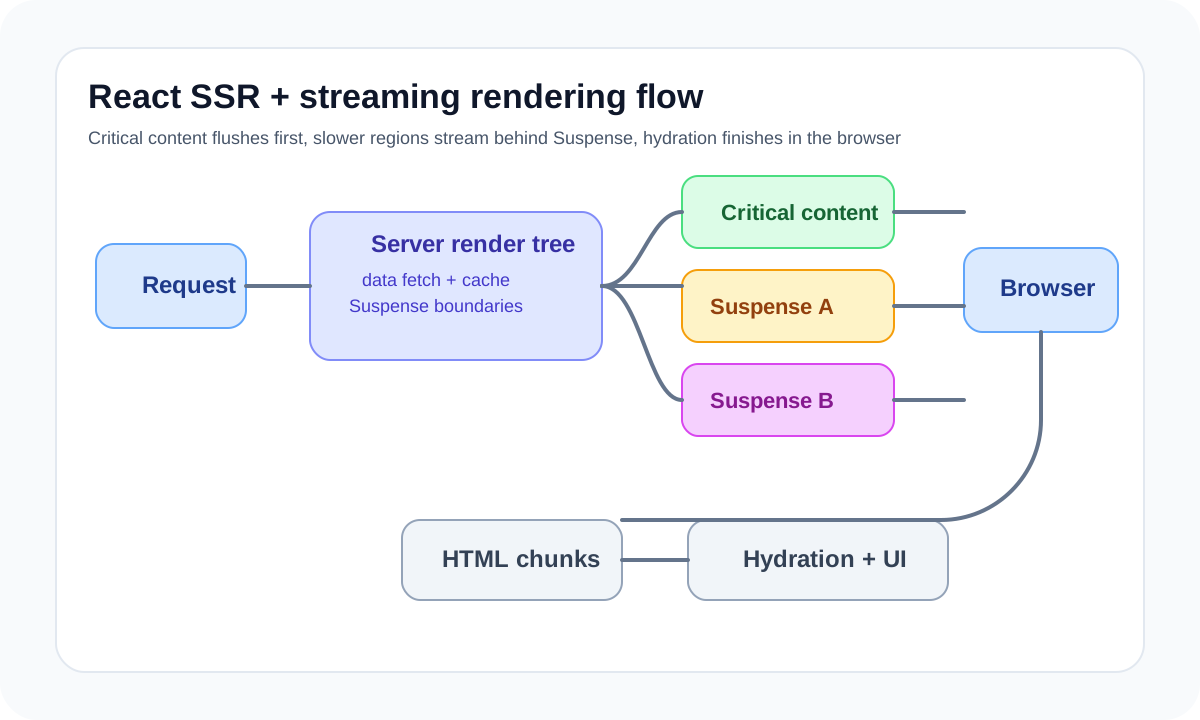
The core idea is simple. The server no longer just sends static files. It partially prepares the React tree, streams out what is ready, and lets the browser progressively turn the result into an interactive experience. This model is powerful, but poor boundary design makes debugging difficult fast.
Architecture diagram
[Request]
   |
   v
[Server Render Tree]
   |
   +--> [Critical Content] ----------> flush early
   |
   +--> [Suspense Boundary A] -------> stream later
   |
   +--> [Suspense Boundary B] -------> stream later
   |
   v
[Browser receives HTML chunks]
   |
   v
[Hydration + Interactive UI]
The point of this structure is not to complete the page all at once, but to send ready content in stages. The server renders important areas first and places slower areas behind Suspense boundaries so they can stream later. In practice, performance depends more on which boundaries are prioritized and which data can wait than on React alone.
Why use SSR and streaming
This combination mainly creates value in three ways.
- it makes the first screen feel faster
- it reduces full-page blocking caused by a few slow data dependencies
- it provides stable SEO and initial metadata
On a large page where only some regions are slow, showing critical content first and filling in the rest later often feels much better than waiting for everything and sending one complete response.
SSR and streaming change component structure
In an SPA, a component can fetch data after mount without much concern. In SSR and streaming, you have to think about which boundaries render first, what data must come before rendering, and which regions should be grouped behind Suspense.
That means the component tree is no longer just a UI structure. It also expresses rendering priority, data parallelism, and loading UX.
The important questions become these.
- what information must users see first
- which slow data can be deferred behind a boundary
- whether loading states make the screen feel unstable
- which data must be server-prepared versus continued on the client
Suspense boundaries are both UX boundaries and system boundaries
Suspense is one of the most important design elements in streaming. Many teams treat it only as a loading-spinner mechanism, but it is actually a boundary for splitting both UI and data.
A good Suspense boundary usually has these qualities.
- it aligns with a meaningful content block for the user
- the fallback does not destabilize the screen structure
- fast and slow regions are naturally separated
- failure scope stays predictable
Wrapping the entire page in one Suspense boundary or splitting it into dozens of tiny loading islands are both usually poor outcomes.
Data fetching must be designed for parallelism and cache
Where and how data is fetched has a major impact on SSR and streaming performance. If requests happen serially, you still get waterfall behavior even on the server, and streaming loses much of its value.
That makes the following strategies important.
- fetch independent data in parallel when possible
- move slow but non-critical data behind deferrable boundaries
- separate cacheable requests from user-specific ones
- align revalidation rules with the nature of each dataset
In many slow SSR systems, the real issue is not React but a badly designed request graph.
Be explicit about server and client component boundaries
In modern React SSR environments, the line between server components and client components is a major design point. Data access that only the server needs, work you do not want to expose to the browser, and rendering with heavy dependencies usually belong on the server. Interaction-heavy pieces and anything tied to browser APIs belong on the client.
The key is that this boundary is not just a technical constraint. It is a responsibility split. The server is strong at data preparation and security boundaries. The client is strong at immediacy and interaction.
Without a cache strategy, SSR gets expensive fast
SSR and streaming can feel fast when designed well, but if every request renders against origin data every time, operational cost rises sharply. That is why page cache, data cache, CDN cache, and user-specific response separation must be considered together.
Teams especially need clear answers to these.
- should public and personalized content be mixed in one response
- at which layer should reusable data be cached
- what events should invalidate cache
- how real-time each region truly needs to be
SSR without cache often turns into a structure that is both slow and expensive.
Observability matters for operations
Streaming rendering can look simple from the browser, but in production it is hard to tell which boundary was slow, which request was the bottleneck, or how long a fallback stayed visible without proper measurement.
The following are especially useful.
- separate measurement for server render time and API time
- visibility into latency per Suspense boundary
- hydration error collection
- cache hit rate and revalidation cost tracking
- LCP, INP, and TTFB tracking for major pages
Common problems in SSR/streaming
- serialized requests remove the benefit of streaming
- poor boundary design makes fallbacks shake the whole page
- client-only dependencies leak into server boundaries and cause hydration errors
- every request is handled dynamically because there is no cache strategy
- debugging becomes difficult because server and client responsibilities are blurry
Wrap-up
The core of React + SSR/streaming architecture is not “rendering HTML on the server.” It is designing which content should be prepared in which order, which data should be awaited at which boundary, and which parts of the UI should become interactive progressively.
This model is more complex than a plain SPA, but when designed well it provides clear gains in search visibility, initial response quality, and large-page perceived performance. The real question is not whether streaming exists, but whether the team can map it to the information priority and operational model of the service.
What Gets Hard in Production
- Streaming improves perceived speed, but it also makes fallback timing, error boundaries, and cache headers much more consequential.
- The architecture gets fragile if teams mix server rendering, edge caching, and client fetch retries without a clear ownership model.
- Hydration mismatches become harder to debug because partial HTML can arrive before all data dependencies settle.
Architecture Decisions That Matter
- Define which route segments must block, which can stream, and which should defer to the client.
- Keep data fetching close to the render boundary that owns suspense and error recovery.
- Align CDN caching and application revalidation so the stream does not deliver stale shells around fresh data or the reverse.
Practical Example
A practical approach is to stream a stable shell first and isolate slower regions behind explicit suspense boundaries:
return (
  <PageLayout>
    <HeroSummary data={criticalData} />
    <Suspense fallback={<OrdersSkeleton />}>
      <RecentOrders />
    </Suspense>
    <Suspense fallback={<RecommendationsSkeleton />}>
      <Recommendations />
    </Suspense>
  </PageLayout>
)
Anti-Patterns to Avoid
- Streaming every section because it looks modern, even when user flow requires a complete above-the-fold state.
- Letting one oversized data loader feed the whole page and then expecting suspense to recover granularity later.
- Ignoring observability for server render time, time to first byte, and hydration error rate.
Operational Checklist
- Measure first byte, first contentful paint, and hydration completion together.
- Track where server suspense boundaries are waiting and why.
- Test degraded backend latency and partial API failure paths.
- Verify cache keys and revalidation rules per streamed segment.
Final Judgment
React SSR streaming is powerful when the page is intentionally segmented around user-visible priority. Without that discipline, streaming adds moving parts faster than it adds value.
Continue Reading
Related posts
Nuxt Architecture Design Guide
This guide explains the rendering strategy, data layer, routing boundaries, caching, and operating model to consider when designing a Nuxt-based frontend architecture.
🖥️ FrontendReact Architecture Design Guide
This guide explains how to design a React application as a maintainable system, covering component boundaries, state layers, server state, rendering models, and team collaboration structure.
⚙️ BackendA Practical Guide to CQRS and Event Sourcing
This guide explains CQRS and Event Sourcing in terms of domain boundaries, projections, consistency tradeoffs, snapshots, and operational complexity.
💬 LanguageType Narrowing at I/O Boundaries
A type system is strong inside the application, but external input still needs to be narrowed and validated early. This guide explains the boundary strategy.
Next Path