Mastering React Server Components: RSC and Server Actions
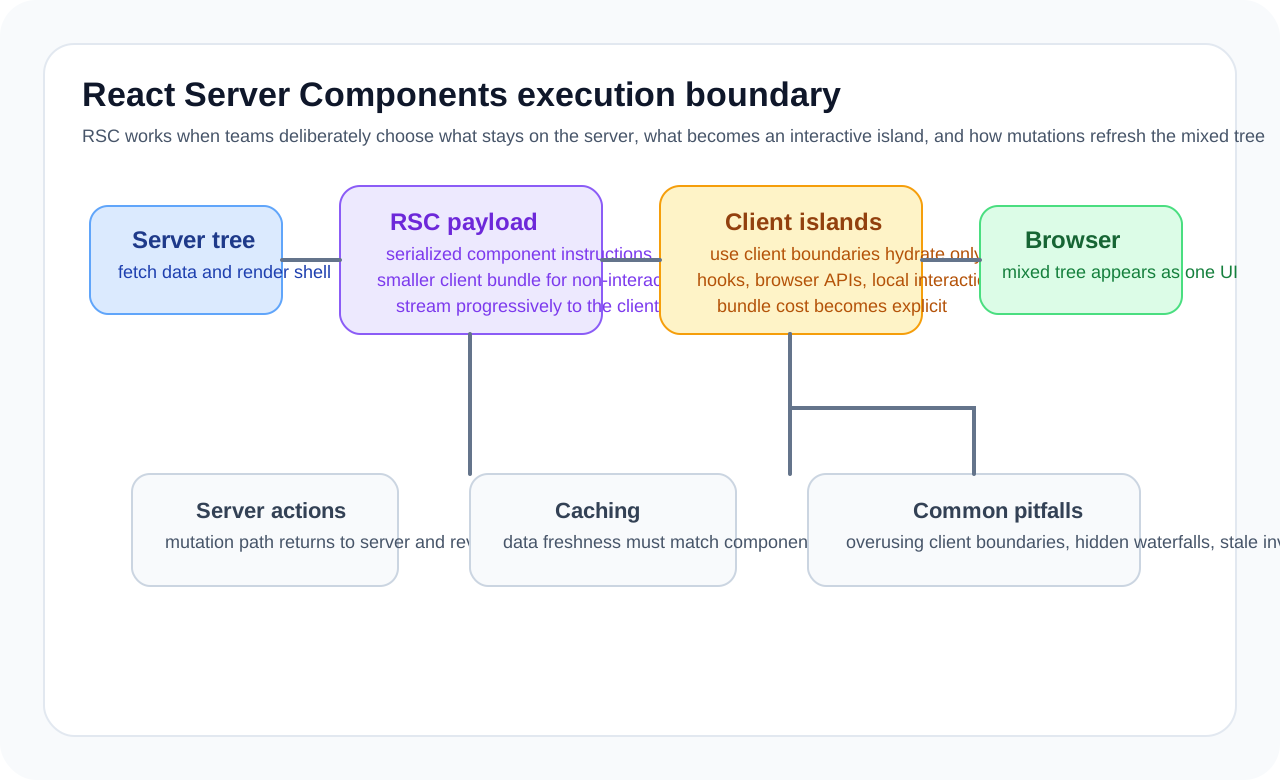
Many articles describe RSC as an extension of SSR, but the practical difference is bigger.
- libraries needed only on the server can stay out of the browser bundle
- data fetching code can live closer to the screen structure
- only the parts that truly need interaction have to move to the client
At the same time, poor boundary design can make an App Router project more complicated rather than less. The key question is not simply how to use RSC, but how far a screen should stay server-first.
The real problem RSC solves
Traditional React applications often carried two costs at once.
- server-side logic for fetching data
- client-side logic for user interaction
The trouble was that as these concerns mixed together, code that was only useful on the server often got dragged into the client bundle too. Markdown parsers, data formatters, and complex query assembly logic are common examples.
RSC addresses that by changing the default.
- keep components as server components first
- turn only stateful or event-driven parts into client components
That shifts the center of optimization toward reducing the client bundle.
The most important rule: lower the client boundary as late as possible
A common App Router mistake is converting an entire page to 'use client' too early. Once something crosses into the client boundary, its subtree becomes much more likely to affect the client bundle.
A simple rule works well.
- keep data reads, permission checks, markdown conversion, and formatting on the server
- send only interaction such as form state, modal open and close, or click handlers to the client
// app/posts/[id]/page.tsx
import { marked } from 'marked'
import { db } from '@/lib/db'
import { LikeButton } from '@/components/LikeButton'

export default async function PostPage({
  params,
}: {
  params: { id: string }
}) {
  const post = await db.post.findUnique({
    where: { id: params.id },
  })

  if (!post) {
    return notFound()
  }

  const html = marked(post.content)

  return (
    <article>
      <h1>{post.title}</h1>
      <LikeButton postId={post.id} initialCount={post.likeCount} />
      <div dangerouslySetInnerHTML={{ __html: html }} />
    </article>
  )
}
Here, marked and the DB call never go down to the client. That is one of the most practical strengths of RSC, especially on dashboards, content services, and commerce detail pages where reading dominates over interaction.
Treat client components like interactive islands
'use client'

import { useState, useTransition } from 'react'
import { toggleLike } from '@/app/actions'

type Props = {
  postId: string
  initialCount: number
}

export function LikeButton({ postId, initialCount }: Props) {
  const [count, setCount] = useState(initialCount)
  const [isPending, startTransition] = useTransition()

  return (
    <button
      disabled={isPending}
      onClick={() =>
        startTransition(async () => {
          const nextCount = await toggleLike(postId)
          setCount(nextCount)
        })
      }
    >
      {isPending ? 'Updating...' : `❤️ ${count}`}
    </button>
  )
}
The point is not to make the whole page a client component for one button. This works much more like an interactive island.
Good RSC design often begins with these questions.
- Does this state really need to live in the browser?
- Does this event handler really need to execute in the browser?
- Is there any reason to send this library to the user?
Server Actions change where form handling lives
Server Actions are often explained as “you do not need API routes anymore,” but the more important shift is that write operations move closer to the component boundary.
// app/actions.ts
'use server'

import { z } from 'zod'
import { revalidatePath } from 'next/cache'
import { redirect } from 'next/navigation'

const CreatePostSchema = z.object({
  title: z.string().min(1).max(100),
  content: z.string().min(10),
  tags: z.string().transform((value) =>
    value
      .split(',')
      .map((tag) => tag.trim())
      .filter(Boolean),
  ),
})

export async function createPost(formData: FormData) {
  const raw = {
    title: formData.get('title'),
    content: formData.get('content'),
    tags: formData.get('tags'),
  }

  const parsed = CreatePostSchema.safeParse(raw)
  if (!parsed.success) {
    return { errors: parsed.error.flatten().fieldErrors }
  }

  const post = await db.post.create({
    data: {
      ...parsed.data,
      authorId: await getCurrentUserId(),
    },
  })

  revalidatePath('/posts')
  redirect(`/posts/${post.id}`)
}
// app/posts/new/page.tsx
import { createPost } from '@/app/actions'
export default function NewPostPage() {
return (
<form action={createPost}>
<input name="title" placeholder="Title" />
<textarea name="content" placeholder="Content" />
<input name="tags" placeholder="Tags (comma separated)" />
<SubmitButton />
</form>
)
}This works especially well for the following.
- CRUD screens that naturally fit HTML forms
- flows where cache invalidation should follow a DB write immediately
- products where simple server-centered write paths fit better than client-heavy state management
If you also have mobile apps, public APIs, or third-party integrations, a traditional API layer can still be clearer. Server Actions do not replace every API design.
Streaming and Suspense are about choosing what to show first
In RSC environments, Suspense is a core UX optimization tool. The goal is not to wait for everything and render once, but to prioritize the pieces the user should see first.
import { Suspense } from 'react'

export default function DashboardPage() {
  return (
    <div className="grid grid-cols-2 gap-4">
      <UserProfile />

      <Suspense fallback={<StatsSkeleton />}>
        <RevenueStats />
      </Suspense>

      <Suspense fallback={<OrdersSkeleton />}>
        <RecentOrders />
      </Suspense>
    </div>
  )
}

async function RevenueStats() {
  const stats = await fetchRevenueStats()
  return <StatsCard data={stats} />
}
In production, the choice of which components sit behind Suspense boundaries is directly tied to UX design. Wrapping the whole page in one boundary weakens the benefit of streaming. Splitting everything too finely often creates too many loading fragments and makes the page feel noisy.
Without understanding caching, RSC projects get confusing fast
The most common App Router confusion sounds like this.
- Why is the data not changing?
- Why is it refetching every time?
That almost always comes back to the cache model.
async function getPost(id: string) {
  const res = await fetch(`https://api.example.com/posts/${id}`, {
    next: {
      revalidate: 3600,
      tags: [`post-${id}`],
    },
  })

  if (!res.ok) {
    throw new Error('Failed to fetch post')
  }

  return res.json()
}
import { revalidateTag } from 'next/cache'
export async function updatePost(id: string, data: PostData) {
await db.post.update({
where: { id },
data,
})
revalidateTag(`post-${id}`)
}It helps to classify cache policy like this.
- read-heavy data that changes infrequently:
revalidate - data that should refresh only after specific writes:
tags+revalidateTag - truly always-fresh real-time data:
noStore()
The important idea is not memorizing API options. It is recognizing that each domain dataset has its own consistency expectations.
Common misunderstandings about RSC
1. Server components are always fast
Only partly. They reduce bundle cost, but if the backend calls are slow, the result can still be slow. The real bottleneck is usually not where rendering happens, but what the screen is waiting on.
2. If you have Server Actions, you do not need APIs
That can be true for internal web apps, but once public APIs, mobile clients, or third-party integrations exist, a separate API layer still matters.
3. 'use client' does not make a big difference
In reality, it can have a large impact because the effect propagates to the subtree and its dependencies. It should be applied carefully and minimally.
Useful team-level rules
RSC benefits from team conventions even more than personal projects do. These are good starting rules.
- write server components by default
- switch to client components only for browser state or events
- keep data fetching as close to the screen as possible
- document cache invalidation rules by domain
- standardize return and error shapes for Server Actions
Without that kind of agreement, code reviews drift into taste debates very quickly.
When RSC is especially effective
- content-heavy services
- admin dashboards
- commerce product and order management screens
- pages where server data matters a lot and interaction is only partial
On the other hand, products centered on canvas editing, real-time collaboration, or complex drag-and-drop UI often gain less from RSC because client state and interaction dominate the experience.
Wrap-up
The essence of React Server Components is not “running React on the server.” It is an architectural choice to leave only the code that truly belongs in the client on the client. Once that perspective is in place, client boundaries, Server Actions, caching, and streaming all connect into one coherent model.
In production, the most useful habit is to ask, every time a feature is added: does this logic really need to live in the browser?
What Gets Hard in Production
- Server Components reduce client bundle pressure, but they force the team to think harder about ownership of data fetching, interactivity, and cache lifetime.
- The boundary between server and client modules becomes a new architectural seam that can either simplify the app or fragment it.
- Misplaced client components can quietly pull large dependency trees back into the browser bundle.
Architecture Decisions That Matter
- Move read-heavy rendering and direct data access to server components, and keep interaction-heavy islands deliberately client-side.
- Treat serialization boundaries as part of API design, especially when passing complex models to client components.
- Define cache and revalidation policy next to the data access path, not separately in distant helpers.
Practical Example
A useful split keeps the list on the server and the interaction island on the client:
export default async function OrdersPage() {
  const orders = await getOrders()

  return (
    <div>
      <OrdersTable orders={orders} />
      <ClientFilters />
    </div>
  )
}
Anti-Patterns to Avoid
- Turning almost every component into a client component to avoid boundary thinking.
- Passing deeply nested, unstable objects over the server-client boundary.
- Assuming Server Components remove the need for backend performance work.
Operational Checklist
- Track client bundle impact of
use clientfiles. - Measure cache hit rate and revalidation behavior on server data paths.
- Review serialization cost and payload size.
- Test fallback UX for slow server-side dependencies.
Final Judgment
Server Components are most valuable when they sharpen the divide between read-heavy rendering and client interaction. Used indiscriminately, they create new boundaries without clearer ownership.
Continue Reading
Related posts
React Architecture Design Guide
This guide explains how to design a React application as a maintainable system, covering component boundaries, state layers, server state, rendering models, and team collaboration structure.
🖥️ FrontendNext.js 14 App Router Complete Guide: From Server Components to Routing
This guide explains the Next.js App Router not as a folder-structure checklist, but as a rendering model. It covers server components, client components, layouts, loading and error handling, caching, and route handlers from a practical perspective.
📈 TrendsWhat the React Foundation Means for Engineering Teams
Why the React Foundation matters beyond governance news, and how it may affect framework coordination, ecosystem stewardship, and long-term frontend strategy.
🧪 TestPractical React Testing Library Design Guide
How to use React Testing Library as a user-centered testing tool. Covers query priority, interaction tests, async UI, provider wrappers, and how to avoid excessive mocking.
Next Path