Micro Frontends: Applying Module Federation in Production
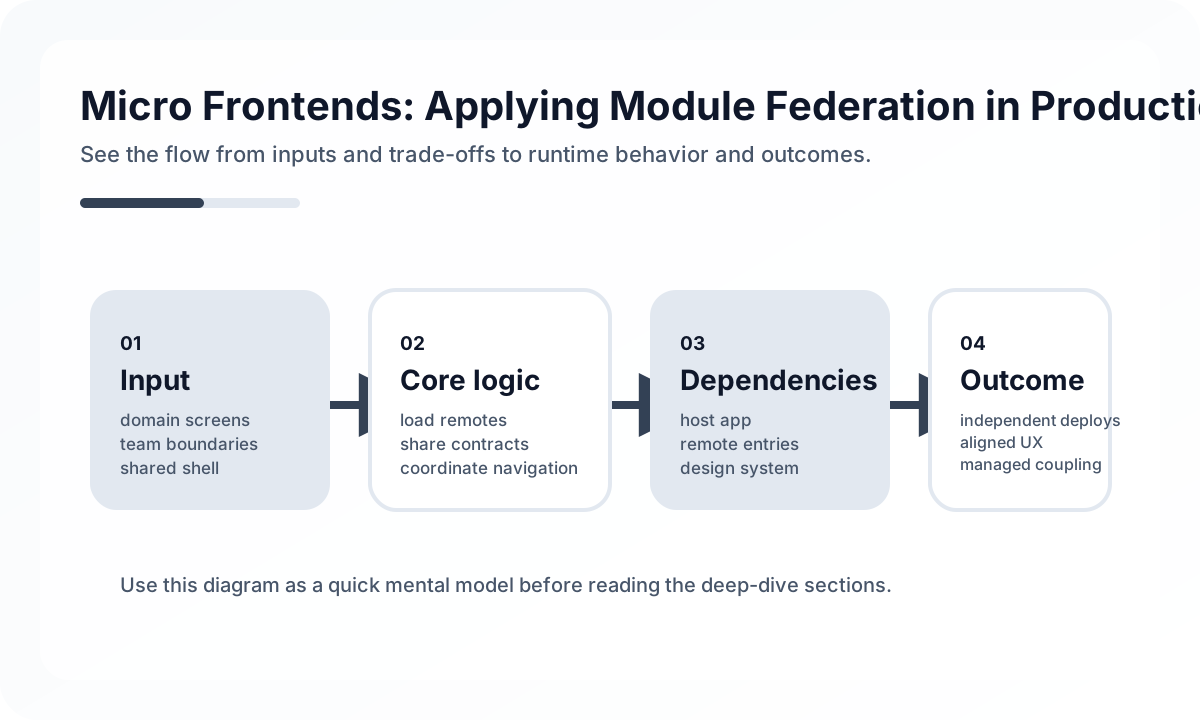
Teams may want to develop and deploy independently, but users do not want the header, cart, and checkout flow to feel like unrelated applications. That is why the core of micro frontends is not just separation, but balancing independence and consistency.
Module Federation is one of the best-known tools for this. But the value it brings also comes with new complexity around shared dependencies, runtime failures, design consistency, and state sharing.
Architecture diagram
[Shell App]
    |
    +--> [Remote: Catalog]
    +--> [Remote: Checkout]
    +--> [Remote: Account]
    |
    v
[Shared Contracts]
 routing / auth / design system / events
In this model, each team can deploy part of the UI independently, but the contract between the shell and each remote becomes much more important. If auth, routing, shared UI, and version compatibility are not organized well, independent deployment turns into runtime confusion. In that sense, micro frontends are less a partitioning technology and more a contract-management technology.
Real signals that micro frontends may be needed
Adopting them just because they are technically possible is usually overkill. They tend to be valuable when signals like these appear.
- multiple teams are constantly blocking each other in one frontend app
- specific features need to be deployed independently
- domain-based UI ownership needs to be explicit at the organizational level
- certain groups of screens have clearly different stacks or release cadence
If the team is still small and the codebase is still manageable, a well-structured frontend monolith is usually faster and more stable.
Micro frontends are really about ownership boundaries
A good structure usually lines up with work boundaries.
shell (host)          shell.example.com
├── header/           teams-a.example.com
├── product-list/     teams-b.example.com
├── cart/             teams-c.example.com
└── checkout/         teams-d.example.com
The key point here is ownership, not technology.
- Which team owns which screen fragment?
- Is that fragment worth deploying independently?
- Can it reduce dependency on changes from other teams?
Module Federation is therefore less a code-splitting tool and more a way to carry team boundaries all the way into runtime.
The shell should orchestrate, not become another monolith
const { ModuleFederationPlugin } = require('@module-federation/enhanced/webpack')

module.exports = {
  plugins: [
    new ModuleFederationPlugin({
      name: 'shell',
      remotes: {
        header: 'header@https://header.example.com/remoteEntry.js',
        products: 'products@https://products.example.com/remoteEntry.js',
        cart: 'cart@https://cart.example.com/remoteEntry.js',
      },
      shared: {
        react: { singleton: true, requiredVersion: '^18.0.0' },
        'react-dom': { singleton: true, requiredVersion: '^18.0.0' },
        '@company/ui': { singleton: true },
      },
    }),
  ],
}
The shell should mainly own routing, shared layout, initial bootstrap, and coordination of shared dependencies. The important rule is not to let the shell absorb too much business logic. Once it does, it becomes another central bottleneck that every team depends on.
shared is a runtime contract
One of the most sensitive parts of Module Federation is the shared configuration. For core libraries like React, using a singleton is usually the safest option.
The reasons are straightforward.
- if multiple copies of React load, hook context can break
- if the design system is duplicated, style and state consistency can break
- version mismatches often appear only at runtime
That makes shared less about reducing duplicate bundles and more about deciding which libraries count as shared contracts inside the same browser runtime.
Expose remotes at a meaningful feature level
new ModuleFederationPlugin({
  name: 'products',
  filename: 'remoteEntry.js',
  exposes: {
    './ProductList': './src/components/ProductList',
    './ProductDetail': './src/components/ProductDetail',
    './useCart': './src/hooks/useCart',
  },
  shared: {
    react: { singleton: true },
    'react-dom': { singleton: true },
  },
})
If a remote starts exposing too many tiny internal pieces, other teams begin depending on implementation details and coupling rises again. Exposed APIs should stay focused on public surfaces with business meaning.
Runtime loading adds flexibility and failure points
import React, { Suspense, lazy } from 'react'

const ProductList = lazy(() => import('products/ProductList'))
const Cart = lazy(() => import('cart/CartWidget'))

export function App() {
  return (
    <div>
      <Suspense fallback={<ProductListSkeleton />}>
        <ProductList />
      </Suspense>
      <Suspense fallback={<CartSkeleton />}>
        <Cart />
      </Suspense>
    </div>
  )
}
This approach has obvious strengths.
- independently deployed UI can be loaded at runtime
- features can be swapped without redeploying the shell
- the initial bundle can sometimes be reduced
But the trade-offs are real too.
- a failed remote load becomes a user-facing screen error
- CDN, cache, and version mismatch problems show up at runtime
- differences between development and production environments need tighter control
That is why graceful degradation and strong fallback UI matter even more in MFE systems.
Type safety does not come automatically
export interface ProductListProps {
  categoryId?: string
  onAddToCart: (productId: string) => void
}

declare module 'products/ProductList' {
  import { ProductListProps } from '@company/mfe-types'
  const ProductList: React.FC<ProductListProps>
  export default ProductList
}
Because the app is assembled at runtime, compile-time safety gets looser by default. Shared type packages, contract versioning, and documentation of public APIs become much more important. In this model, operational discipline around contracts often matters more than code sharing itself.
Minimize state sharing
Many teams initially want multiple MFEs to share one global store. That usually increases coupling quickly. In many cases, message-based communication is a healthier default.
function CartButton({ productId }: Props) {
  const handleAdd = () => {
    window.dispatchEvent(
      new CustomEvent('cart:add', {
        detail: { productId, quantity: 1 },
      }),
    )
  }

  return <button onClick={handleAdd}>Add to cart</button>
}

function CartCount() {
  const [count, setCount] = useState(0)

  useEffect(() => {
    const handler = () => setCount((value) => value + 1)
    window.addEventListener('cart:add', handler as EventListener)
    return () => window.removeEventListener('cart:add', handler as EventListener)
  }, [])

  return <span>{count}</span>
}
This kind of approach keeps coupling loose. Event names and payloads still need to be managed carefully, but at least teams do not share internal store structure directly.
Dynamic remote URLs are part of the operating model
const remoteUrlMap = {
  development: {
    products: 'http://localhost:3001/remoteEntry.js',
    cart: 'http://localhost:3002/remoteEntry.js',
  },
  production: {
    products: 'https://products.example.com/remoteEntry.js',
    cart: 'https://cart.example.com/remoteEntry.js',
  },
}[process.env.NODE_ENV]
Dynamic URL mapping adds deployment flexibility, but it also brings operational questions with it.
- How will cache invalidation work?
- Can one remote be rolled back independently?
- How will compatibility between shell and remote versions be tracked?
- Can a failing remote be disabled temporarily?
This is why MFE is a frontend structure that deeply intersects with CDN, deployment, cache, and compatibility concerns.
CI/CD must uphold the promise of independent deployment
on:
  push:
    paths:
      - 'apps/products/**'

jobs:
  deploy:
    steps:
      - run: npm run build --workspace=apps/products
      - name: Deploy to CDN
        run: aws s3 sync dist/ s3://products-mfe/ --cache-control max-age=31536000
      - run: aws cloudfront create-invalidation --paths '/remoteEntry.js'
The critical detail here is not caching remoteEntry.js the same way as other bundled assets. Asset bundles can often use strong caching, but remoteEntry.js acts as the live entrypoint to a new deployment and needs more careful handling.
The biggest risk is a fragmented UX
Even if runtime assembly works technically, users stop feeling like they are in one product when these break.
- design-system consistency
- loading and error-handling experience
- accessibility standards
- routing and navigation feel
- performance budget
That is why adopting MFEs usually means shared design systems, lint and test rules, accessibility standards, and performance budgets need to get stronger, not weaker.
When Module Federation fits especially well
- multiple teams must strongly own domain-specific UI
- independent deployment has real business value
- the shared platform and design system are already reasonably mature
- the frontend platform team can handle the extra operational complexity
If the team is still small and product boundaries are still shifting rapidly, MFE is usually too heavy.
Wrap-up
The essence of a Module Federation-based micro frontend is not runtime import. It is realizing frontend ownership boundaries and deployment independence inside the browser environment.
In the right organization it can be very effective, but only if shared dependencies, contract management, UX consistency, and operational strategy all mature alongside it. The real question is not “Can we split it?” but “Does this split create a real benefit for both the team and the user?”
What Gets Hard in Production
- Micro frontends help organizational scaling only if ownership boundaries are stronger than the integration cost they introduce.
- Module Federation shifts complexity into dependency compatibility, shared runtime contracts, and release coordination.
- The technical challenge is rarely loading remote code; it is keeping UX and operational behavior coherent across teams.
Architecture Decisions That Matter
- Adopt micro frontends only when team autonomy and release decoupling are hard constraints, not just architectural fashion.
- Define shared dependencies, design tokens, auth context, and error-handling contracts before multiplying remotes.
- Keep domain boundaries coarse enough that remote applications own meaningful workflows, not tiny widgets.
Practical Example
A realistic federation setup shares infrastructure concerns deliberately and keeps feature ownership local:
shell app
  - routing
  - authentication session
  - shared design tokens
remote app A
  - catalog workflow
remote app B
  - checkout workflow
Anti-Patterns to Avoid
- Splitting by page fragments so aggressively that every release requires cross-team debugging.
- Sharing too many libraries as singletons without version discipline.
- Assuming federation solves codebase quality issues that are actually team-process issues.
Operational Checklist
- Track remote load failure rate and fallback behavior.
- Version shared contracts deliberately, especially routing and auth.
- Budget for local development ergonomics across multiple repos or deployables.
- Audit whether release independence is actually happening.
Final Judgment
Micro frontends are a scaling tool for organizations, not a default UI architecture. They are worth it only when team autonomy and independent delivery matter more than the integration overhead.
Continue Reading
Related posts
Designing Partial Hydration Boundaries
Frontend performance improves when teams decide what really needs interaction first, not when they hydrate everything immediately.
🖥️ FrontendServer-Driven UI Trade-offs for Product Teams
Where server-driven UI helps, where it hurts, and how to avoid turning flexibility into a slower product platform.
⚙️ BackendA Practical Guide to CQRS and Event Sourcing
This guide explains CQRS and Event Sourcing in terms of domain boundaries, projections, consistency tradeoffs, snapshots, and operational complexity.
💬 LanguageType Narrowing at I/O Boundaries
A type system is strong inside the application, but external input still needs to be narrowed and validated early. This guide explains the boundary strategy.
Next Path