Frontend Performance Architecture Guide
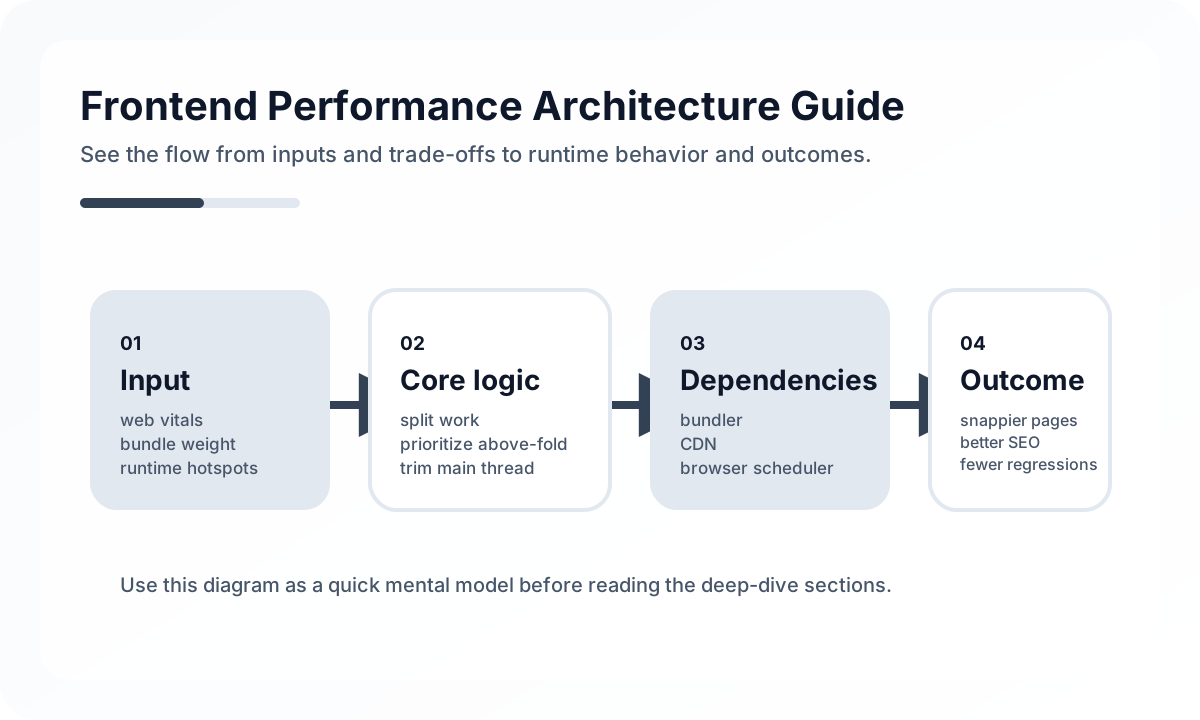
Frontend performance cannot be solved only with checklists like image compression or bundle reduction. As a service grows, performance stops being a matter of a few code lines and becomes the result of rendering strategy, data-fetch order, cache policy, state placement, and user-flow design working together. Performance is not just an optimization task. It is an architectural property.
Architecture diagram
[User Request]
     |
     v
[Rendering Strategy]
 SSR / SSG / CSR / Streaming
     |
     v
[Data Flow]
 prefetch / parallel fetch / cache
     |
     v
[UI Runtime]
 code split / state scope / interaction cost
     |
     v
[Observed Metrics]
 LCP / INP / CLS / error / retry
Performance issues usually do not begin at the last step. They accumulate across this entire flow. A poor rendering strategy slows initial loading, serialized data fetching creates waterfall behavior, and bad state placement raises interaction cost. That is why performance work should begin by locating where latency enters this flow, not by immediately shrinking bundles.
Performance starts with choosing what should be fast
It is not realistic to make everything equally fast. Teams first need to define what matters most.
- Does the first screen need to appear quickly?
- Does search-result navigation need to feel instant?
- Does input responsiveness inside an editor matter most?
- Is dashboard chart loading the main bottleneck?
- Is stability on low-end mobile devices critical?
Without this, teams often end up optimizing Lighthouse scores while missing the places users actually feel pain.
Rendering strategy is the starting point
One of the biggest performance decisions is how each screen should render. Whether everything is handled like an SPA, whether public pages use SSR or SSG, or whether personalized screens stay CSR-first changes the performance profile dramatically.
The important part is not forcing one rendering mode everywhere, but matching the mode to the screen’s purpose.
- public content and search-entry pages care about initial rendering and SEO
- post-login tools care more about interaction latency and state continuity
- frequently revisited pages benefit more from cache and prefetch
Reduce network waterfalls structurally
Many performance problems come less from rendering itself and more from request order. A page that fetches top-level data first, then triggers child requests based on that response, then waits again creates a waterfall that users feel immediately.
A few structural rules help here.
- fetch independent data in parallel
- separate essential data from data that can be delayed
- aggregate API calls in the server or BFF when screen assembly requires it
- prefetch likely-needed data before navigation when possible
State placement creates rendering cost
When teams debug performance problems, the root cause is often state placement. State owned too high in the tree makes small updates rerender wide parts of the app. Values pushed into a global store unnecessarily make the entire application shake more than it should.
That is why performance also depends on keeping state as close as possible to where it is really used.
Bundle optimization is really about code-loading strategy
Bundle size matters, but the deeper question is which code should load when. If admin-only code is included in the main bundle for every user, that is not only a size problem. It is a structural problem.
Effective production strategies often include the following.
- route-level code splitting
- lazy loading heavy editors, charts, and specialized libraries
- on-demand loading for rarely used settings panels and modals
- splitting large dependencies such as locale packages, markdown parsers, or syntax highlighters
Cache affects speed and cost together
Performance is not just a client issue. Real speed and operating cost improve when browser cache, CDN cache, and server-side data cache work together. In SSR environments, it is especially important to think separately about page cache and data cache.
Cache is not just about storing things longer. It is also about how quickly things must become fresh again. That means performance work always includes a consistency trade-off.
Manage interaction performance separately
Even if the first render is fast, the product still feels slow when input latency is high. In tools with tables, filters, editors, drag and drop, or large forms, interaction performance often matters most.
That means looking at questions like these.
- Are synchronous computations during input too heavy?
- Should large lists be virtualized?
- Are filter and sort operations recalculating too much data every time?
- Are animations or layout recalculations blocking the main thread?
Without observability, performance is mostly guesswork
Good performance architecture includes measurement. Without knowing which screens are slow, which APIs are bottlenecks, or which environments suffer most, improvement becomes hard to repeat.
Useful signals usually include these.
- user-centric metrics such as LCP, INP, and CLS
- API latency for key user flows
- bundle and chunk-size change tracking
- hydration errors and long-task frequency
- page transition success rate and failed-request ratio
Common anti-patterns
- treating performance only as a final-phase optimization task
- forcing the same rendering strategy on SEO pages and app-like screens
- adding memoization while leaving request waterfalls in place
- lifting state too high or too globally
- discussing performance from intuition without measurement
Wrap-up
The core of frontend performance architecture is not micro-optimization. It is deciding what to render when, which data to fetch in what order, and where state should live. Performance is not a side effect of code quality. It is the result of product structure.
Good performance is not one fast page. It is a structure that reduces waiting across the service as a whole.
What Gets Hard in Production
- Performance problems usually come from architecture, not isolated micro-optimizations.
- Large bundles, duplicated fetches, poor cache policy, and heavy hydration cost reinforce each other across the page lifecycle.
- Teams often measure only one metric and miss the tradeoff they introduced somewhere else.
Architecture Decisions That Matter
- Define performance budgets for bundle size, route transition time, and critical render path cost.
- Split work between build time, server time, edge cache time, and browser time intentionally.
- Treat caching policy and rendering strategy as one system instead of separate topics.
Practical Example
A useful mental model is to place every expensive task on one stage of the delivery pipeline:
[build time] static assets and precomputed content
[server time] personalized HTML and protected data
[edge cache] reusable responses with clear TTL
[browser time] only interactive work the user actually needs
Anti-Patterns to Avoid
- Chasing memoization before reducing network waterfalls and bundle weight.
- Caching aggressively without checking invalidation cost and correctness.
- Using one rendering mode across all routes because it is organizationally easier.
Operational Checklist
- Track bundle size, route-level API waterfalls, and hydration cost together.
- Measure performance on mid-range mobile devices, not only on developer laptops.
- Review cache hit rate and stale-data incidents side by side.
- Make regressions visible in CI or release review.
Final Judgment
Frontend performance becomes durable when architecture decides where work happens and why. Optimization without workload placement discipline rarely lasts.
Continue Reading
Related posts
Optimizing Core Web Vitals: A Practical Guide to LCP, CLS, and INP
This guide explains Core Web Vitals not as a checklist, but from the perspective of perceived performance and rendering structure. It shows why LCP, CLS, and INP degrade, what to measure first, and how to optimize them in the right order.
🖥️ FrontendDesigning Partial Hydration Boundaries
Frontend performance improves when teams decide what really needs interaction first, not when they hydrate everything immediately.
⚙️ BackendA Practical Guide to CQRS and Event Sourcing
This guide explains CQRS and Event Sourcing in terms of domain boundaries, projections, consistency tradeoffs, snapshots, and operational complexity.
💬 LanguageType Narrowing at I/O Boundaries
A type system is strong inside the application, but external input still needs to be narrowed and validated early. This guide explains the boundary strategy.
Next Path