GitHub Actions CI/CD Design Guide
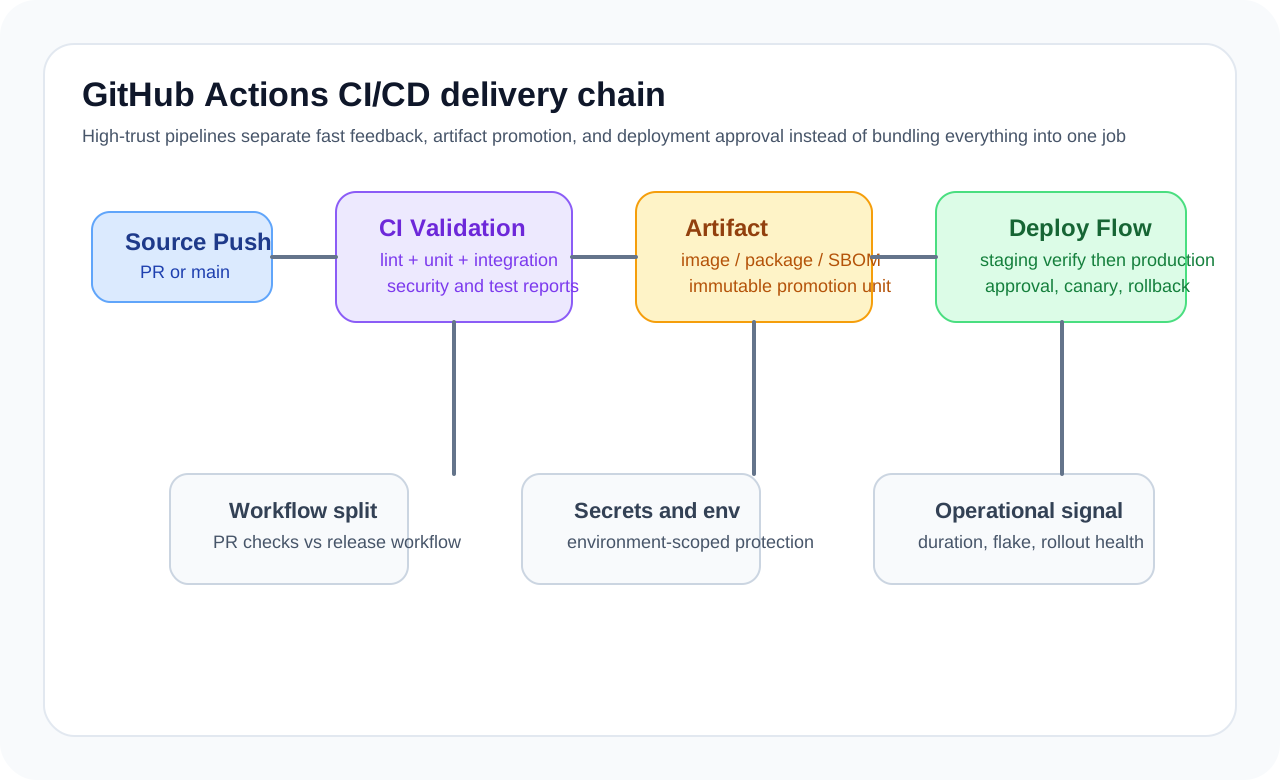
In a pipeline, purpose matters more than sequence
Most workflows look similar. They go through checkout, setup, install, test, build, and deploy. But what matters more than that order is clearly separating the purpose of each stage.
- Validation stage: code quality, tests, static analysis
- Packaging stage: artifact creation, image builds
- Deployment stage: rollout by environment
- Post stage: notifications, release notes, result collection
When these boundaries are clear, it becomes much easier to narrow down the cause of a failure and attach environment-specific policies.
Baseline CI should be fast and predictable
CI is the flow that runs most often for every change, so speed and stability matter. If you mix in long install steps, unnecessary deployment logic, or flaky tests too early, overall trust in the pipeline falls quickly.
name: ci

on:
  push:
    branches: [main, develop]
  pull_request:
    branches: [main]

jobs:
  test:
    runs-on: ubuntu-latest
    steps:
      - uses: actions/checkout@v4
      - uses: actions/setup-node@v4
        with:
          node-version: '22'
          cache: 'npm'
      - run: npm ci
      - run: npm test
In this baseline structure, the important points are:
- Use reproducible
npm ciinstead ofnpm install - Use caching to reduce installation cost
- Focus on validation, not deployment, during the PR stage
- Find and isolate flaky tests early
Environment promotion is better treated as policy than branch naming
Branch-name-based deployment control is simple, but as the organization grows, promotion policy matters more. Staging and production may use the same deployment script, but approvals, secrets, and execution conditions should differ.
jobs:
  deploy-staging:
    if: github.ref == 'refs/heads/develop'
    needs: test
    environment: staging
    runs-on: ubuntu-latest
    steps:
      - name: Deploy to staging
        run: ./deploy.sh staging

  deploy-production:
    if: github.ref == 'refs/heads/main'
    needs: test
    environment: production
    runs-on: ubuntu-latest
    steps:
      - name: Deploy to production
        run: ./deploy.sh production
Using environment lets you separate approval rules, environment-specific secrets, and protection policies directly in GitHub. Production deployments in particular should have more explicit safeguards than a simple branch push.
Docker image builds depend on tag strategy
Building and pushing images is straightforward, but later you need to be able to trace exactly which image came from which code. If you use only latest, the rollback point becomes blurry during an incident.
- name: Login to Docker Hub
  uses: docker/login-action@v3
  with:
    username: ${{ secrets.DOCKERHUB_USERNAME }}
    password: ${{ secrets.DOCKERHUB_TOKEN }}

- name: Build and push
  uses: docker/build-push-action@v5
  with:
    context: .
    push: true
    tags: |
      myapp:latest
      myapp:${{ github.sha }}
    cache-from: type=gha
    cache-to: type=gha,mode=max
In practice, teams usually keep the following together:
- An immutable tag based on
sha - A release version tag
- A branch or environment tag
- Build provenance data for traceability
Secret management needs design, not just storage
It is not enough to simply store secrets in GitHub Actions. What matters more is where they are exposed, at what scope, whether they can accidentally appear in logs, and whether they are separated by environment.
- name: Deploy
  env:
    DB_URL: ${{ secrets.DB_URL }}
    JWT_SECRET: ${{ secrets.JWT_SECRET }}
  run: ./deploy.sh
If secrets are written to files, you also need to think about where the files are created, when they are removed, and whether they can be exposed in output. If the deployment target is a cloud environment, OIDC-based short-lived credentials are usually safer than long-lived passwords.
Reusable workflows create standardization
If multiple repositories repeat similar build and test logic, reusable workflows help a lot. Their value is not just reducing copy-paste, but standardizing the team’s baseline quality expectations.
on:
  workflow_call:
    inputs:
      node-version:
        type: string
        default: '22'

jobs:
  test:
    runs-on: ubuntu-latest
    steps:
      - uses: actions/checkout@v4
      - uses: actions/setup-node@v4
        with:
          node-version: ${{ inputs.node-version }}
      - run: npm ci
      - run: npm test
That said, if a reusable workflow becomes too large, it can fail to absorb real project differences and become more complex instead. It is better to standardize only the parts that are truly common.
Failure patterns seen often
The most common problem is overmixing CI and CD in one file. If someone only wants PR validation but deployment logic is tangled into the same pipeline, it becomes hard to reason about the workflow.
Another common issue is that tests and deployment do not share the same trust level. If you ignore flaky tests and keep automatic deployment running, the team eventually loses trust in the deployment pipeline itself.
Finally, overtrusting caches is also a problem. Caches improve speed, but they can also drag stale state forward, so the cache key strategy needs to be explicit.
Operations checklist
A good GitHub Actions pipeline should be able to answer the following questions.
- Who checks a failed deployment, how, and where?
- Which commit was deployed to which environment?
- Can the same commit be redeployed?
- Are secret access scope and approval procedures appropriate?
- Are slow stages and flaky tests being measured?
Closing thoughts
With GitHub Actions, the operating model matters more than the workflow syntax. If you separate testing and deployment, define clear promotion rules, and systematize your secret and tag strategy, the pipeline becomes more than automation. It becomes the foundation for deployment confidence across the team. CI/CD should not just run quickly. It should remain trustworthy even when it fails.
What Gets Hard in Production
- GitHub Actions scales well only when workflows reflect delivery policy instead of becoming a pile of unowned YAML.
- The difficult problems are reliability, secret scope, runtime cost, and promotion safety.
- A CI pipeline that is flexible but noisy eventually stops being trusted.
Architecture Decisions That Matter
- Split workflows by trigger and responsibility: validation, build, release, and deployment.
- Use reusable workflows and composite actions where policy really repeats.
- Protect environments and secret access with least privilege and explicit approvals where needed.
Practical Example
A clean pipeline usually has separate stages with different trust levels:
pull_request -> lint + test
main merge -> build + package
release tag -> publish artifact
deploy trigger -> environment-specific rollout
Anti-Patterns to Avoid
- Putting every branch rule into one giant workflow file.
- Sharing broad secrets across jobs that do not need them.
- Treating flaky tests as normal background noise.
Operational Checklist
- Track workflow duration, flake rate, and rerun frequency.
- Review cache strategy and artifact retention cost.
- Version reusable workflows carefully.
- Test failure visibility and rollback procedure, not only success paths.
Final Judgment
GitHub Actions is strongest when it encodes delivery policy clearly and predictably. Pipelines that are clever but noisy usually degrade release trust.
Continue Reading
Related posts
Build Provenance and Deployment Gate Operations
Supply-chain security is not complete when an attestation exists. It matters when provenance becomes part of deployment policy.
🚀 DevOpsSoftware Supply Chain Attestations in CI/CD
A practical introduction to SBOMs, provenance, attestations, and release verification for teams hardening modern delivery pipelines.
🧪 TestDesigning Smoke Tests for Release Gates
You cannot run everything before deployment. A strong release gate depends on a short, reliable smoke test set with clear purpose.
🧪 TestManaging the Lifecycle of Test Data
Many unstable tests fail because of data, not assertions. Teams need rules for creation, sharing, cleanup, and retention.
Next Path